
Best Laptops for Business in 2026: Top Professional Models Compared
Choosing a business laptop in 2026 is about much more than picking the fastest processor or the highest-resolution display. The best laptops for business need to balance performance, security, battery life, portability, connectivity, durability, manageability, and long-term value.
Today’s professional laptops also bring new considerations such as Intel Core Ultra, AMD Ryzen AI PRO, dedicated NPUs, Copilot+ PC capabilities, Wi-Fi 7, and increasingly sophisticated hardware-based security.
For professionals working from home, traveling between offices, managing customers, analyzing spreadsheets, attending video meetings, or running demanding business applications, the right laptop can make everyday work noticeably easier.
This guide focuses on what actually matters when buying a professional laptop in the U.S. market in 2026, with two current business-class models examined closely before looking at processors, security, displays, battery life, connectivity, and different buying scenarios.
If you are still deciding between different laptop platforms, our Laptop Buying Guide 2026 provides a broader starting point.
1. Lenovo ThinkPad T14 Gen 7 vs. HP EliteBook 8 G2i — The Two Business Laptops to Consider First
For a professional buyer who wants a genuine business-class machine rather than a consumer laptop with a business-oriented marketing label, the Lenovo ThinkPad T14 Gen 7 and HP EliteBook 8 G2i 14 deserve close attention.
Both are current 14-inch professional systems with Windows 11 Pro configurations, modern Intel Core Ultra processors, enterprise-oriented security features, and connectivity designed for office and mobile work.
Lenovo ThinkPad T14 Gen 7
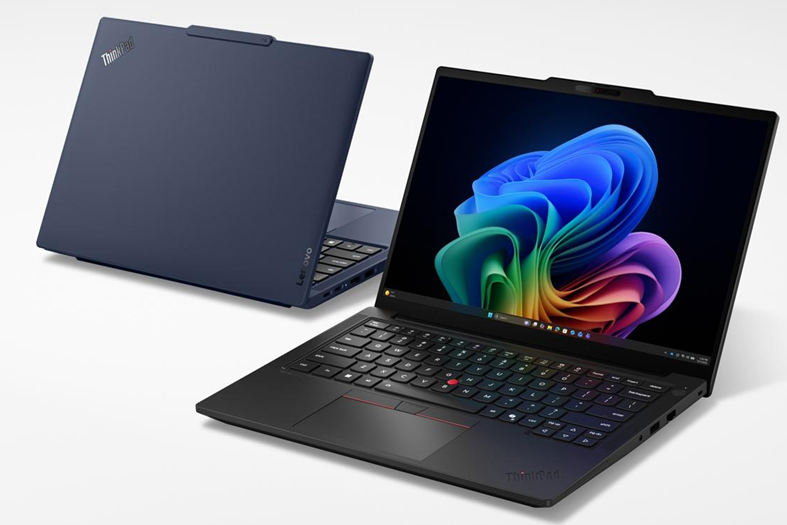
Best for: professionals, corporate employees, IT-managed fleets, consultants, managers, and users who want a strong balance between portability and business features.
Recent U.S. price (as of October 2026): Lenovo’s U.S. store currently lists configurations from around $1,539, with higher-end configurations costing substantially more depending on processor, memory, storage, display, warranty, and other options.
Key specifications vary by configuration, but the Gen 7 Intel platform supports:
- 14-inch display options
- Intel Core Ultra 5, Core Ultra 7 and Core Ultra X7 Series 3 processors
- Up to 50 TOPS NPU capability depending on processor
- Copilot+ PC configurations
- Windows 11 Pro or Windows 11 Home
- PCIe NVMe SSD storage
- LPDDR5x/LPCAMM2 memory configurations depending on model
- Thunderbolt 4
- HDMI
- USB-A
- Gigabit Ethernet
- Optional smart-card and cellular connectivity on selected configurations
Lenovo’s specifications confirm that the ThinkPad T14 Gen 7 Intel platform supports Core Ultra Series 3 processors and up to 50 TOPS NPU performance depending on the selected CPU. Its connectivity includes two Thunderbolt 4 ports, HDMI, USB-A, Ethernet and optional business-oriented features such as a smart-card reader.
Why consider it?
The ThinkPad T14 line has traditionally been designed around professional productivity rather than entertainment-first specifications. That makes the T14 Gen 7 particularly interesting for people who spend most of their day writing, researching, working with spreadsheets, managing projects, attending meetings, or connecting to external displays.
The combination of a 14-inch form factor, business security, extensive connectivity and current Intel Core Ultra processors makes it a strong business productivity laptop.
Pros
- Strong professional-oriented design
- Excellent selection of business connectivity
- Windows 11 Pro configurations available
- Current Intel Core Ultra Series 3 platform
- Copilot+ PC configurations
- Good fit for corporate IT environments
- Strong docking-station potential
- Designed for long-term professional use
Cons
- Higher configurations can become expensive
- Display quality varies substantially by configuration
- Some premium features are optional
- Not designed primarily for gaming or high-end GPU workloads
HP EliteBook 8 G2i 14
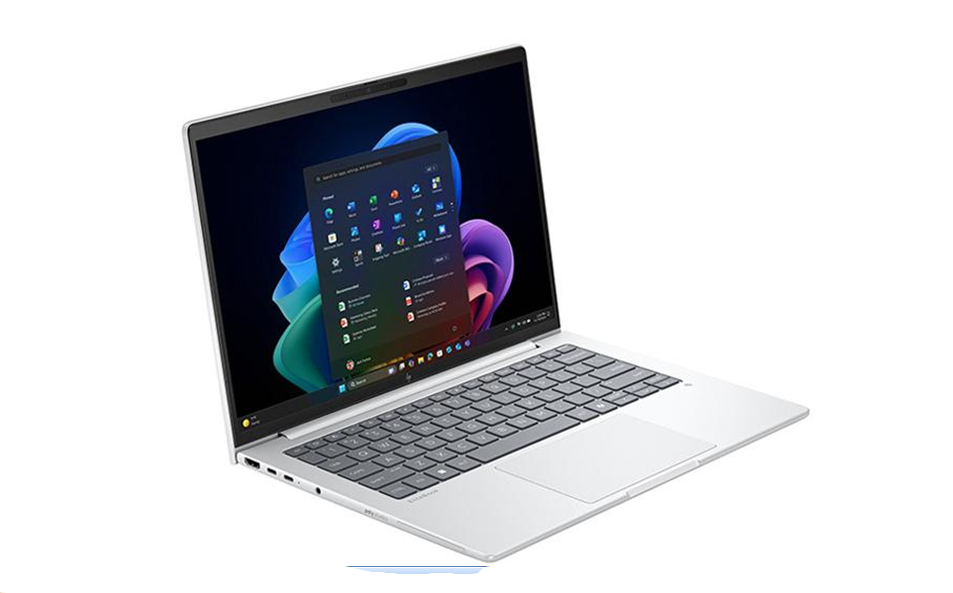
Best for: small businesses, corporate professionals, traveling workers, organizations that prioritize security and warranty support, and users who want a modern Windows business laptop.
Recent U.S. price (as of October 2026): A U.S. configuration checked on September 25, 2026, was listed at $1,349 with an Intel Core Ultra 5 325, 16GB memory and 256GB SSD, although HP pricing varies by configuration and promotion.
HP’s official specifications show configurations with Intel Core Ultra 5 and Core Ultra 7 processors, Windows 11 Pro, DDR5 or LPDDR5x memory depending on configuration, PCIe NVMe storage, a 14-inch WUXGA display, Thunderbolt 4, HDMI 2.1, USB-A, USB-C, Wi-Fi 7, a 5MP IR camera and a 68Wh battery in the configuration documented by HP.
The EliteBook 8 G2i also emphasizes HP Wolf Security and enterprise management. That makes it particularly interesting for professionals who view security and IT support as equally important as raw processing speed.
Why consider it?
The EliteBook 8 G2i is a good example of how a modern business laptop is becoming an AI PC without abandoning traditional enterprise requirements.
It combines a current Intel processor and NPU with features such as Windows 11 Pro, biometric authentication, enterprise security, Wi-Fi 7, Thunderbolt 4 and business warranty options.
Pros
- Strong business-focused security features
- Windows 11 Pro available
- Modern Intel Core Ultra platform
- Wi-Fi 7
- Thunderbolt 4
- 5MP IR camera on documented configurations
- Good connectivity
- Business-oriented warranty options
Cons
- Configuration choices can make pricing confusing
- Entry configurations may have only 256GB storage
- Display quality differs between configurations
- Higher-end configurations become expensive
2. What Makes a Laptop a True Business Laptop?
A professional laptop is not automatically a business laptop simply because it costs more than a consumer model.
A genuine enterprise laptop typically places greater emphasis on security, manageability, durability, warranty options, connectivity, serviceability and predictable deployment.
For a corporate buyer, these characteristics can matter more than having the fastest CPU available.
A business laptop should ideally provide:
- Windows 11 Pro or another appropriate professional operating system
- TPM 2.0 security
- Reliable biometric authentication
- Strong webcam and microphone performance
- Modern Wi-Fi
- Multiple display and docking options
- USB-C and Thunderbolt connectivity where appropriate
- Business-class warranty and support
- Durable construction
- Manageability features for IT departments
Intel’s business PC platform, for example, combines performance, hardware-based security, stability and remote management through Intel vPro on supported systems.
For AMD-based systems, Ryzen AI PRO platforms similarly target business security, manageability and long-term professional deployment.
Read our Laptop Buying Guide 2026 if you want a broader explanation of the buying process.
3. CPU Performance — Intel, AMD and Apple Silicon
The processor remains important, but business users should not choose a laptop solely because its CPU has a higher model number.
Modern business systems increasingly use three major platforms: Intel Core Ultra, AMD Ryzen AI PRO and Apple silicon.
Intel Core Ultra
Intel Core Ultra processors are now common across modern Windows professional laptops. Many current business systems also include an NPU for AI workloads.
For organizations using Intel vPro platforms, the value goes beyond processor speed. Intel describes vPro as a business platform incorporating security, manageability, stability and performance capabilities.
AMD Ryzen AI PRO
AMD’s Ryzen AI PRO platform targets professional environments with AI acceleration, security and enterprise management.
For companies already standardized on AMD systems, Ryzen AI PRO can be an attractive alternative to Intel, particularly for users who need strong CPU performance and efficient local AI processing. Learn more about AMD’s business processors, you can also learn more amout Apple.
Apple’s Mac platform is a different proposition because it combines Apple’s processor, operating system and software ecosystem.
A MacBook can be an excellent business laptop for organizations that already use macOS, particularly in creative, software, media and executive environments.
However, companies dependent on Windows-only applications, specialized enterprise software or Windows device management should verify compatibility before switching. See Apple’s Mac lineup
If you are deciding between Windows and macOS, our MacBook Air vs. Windows Laptop comparison is a useful next step.
4. How Much RAM and Storage Do You Need?
For most professionals in 2026, 16GB of RAM should be considered the practical starting point rather than a luxury.
A user running a browser with dozens of tabs, Microsoft 365 applications, video meetings, messaging tools and large spreadsheets can quickly put pressure on a low-memory configuration.
Recommended memory
User type |
Recommended RAM |
| Basic office work | 16GB |
| Business multitasking | 16–32GB |
| Developers and analysts | 32GB |
| Engineering/content creation | 32GB or more |
| Heavy professional workloads | 64GB where supported |
Storage is equally important.
A 512GB SSD is a sensible target for many professionals. A 256GB drive can work for cloud-centric users, but it can become restrictive once Windows, applications, documents, media and cached files accumulate.
Look for PCIe NVMe SSD storage and check whether the specific model allows storage upgrades.
Our Laptop Processor Guide 2026 goes deeper into processor selection.
5. Security Should Be a Priority
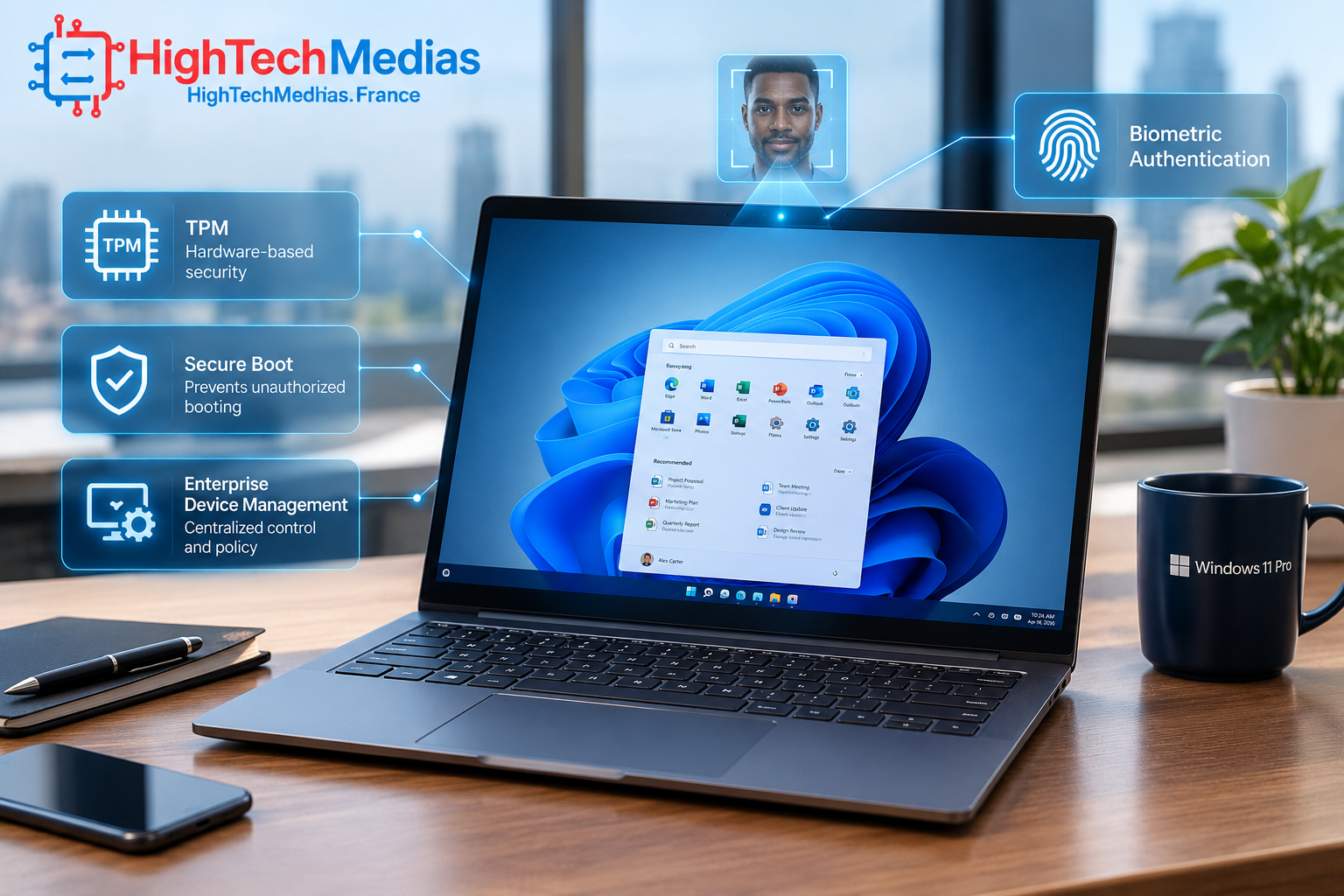
Business laptop security is one of the biggest differences between a professional machine and a typical consumer laptop.
Look for:
- TPM 2.0
- Secure Boot
- Fingerprint authentication
- IR facial recognition where available
- Hardware-based security
- BIOS protection
- Windows 11 Pro
- Enterprise management
- Optional Intel vPro or AMD PRO features
Intel explains that vPro security operates across multiple layers, including hardware, firmware, hypervisor, operating system and applications.
This matters because company data can be exposed even when the laptop itself appears to be functioning normally. Hardware and firmware security can therefore provide an additional foundation underneath traditional software security.
For companies managing multiple machines, remote management can also reduce the need for technicians to physically handle every device. Intel vPro Manageability, for example, supports remote discovery, maintenance and recovery capabilities on supported systems.
6. Display Quality Matters More Than Many Buyers Expect
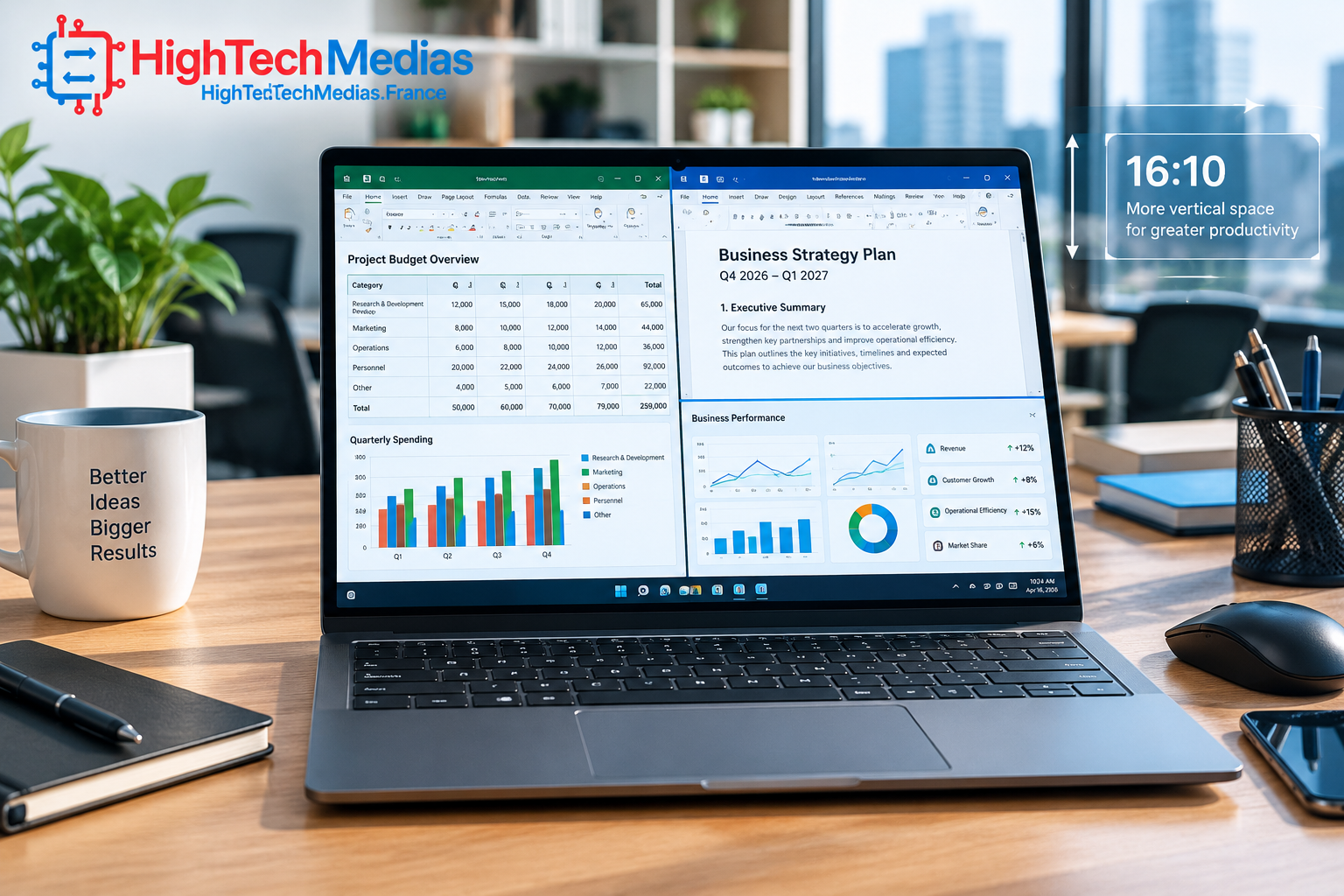
A 14-inch display remains one of the best compromises for professional work.
It offers enough screen area for documents and spreadsheets while keeping the laptop reasonably portable.
For business users, prioritize:
- 1920 × 1200 or higher resolution
- 16:10 aspect ratio
- Good brightness
- Anti-glare treatment
- Accurate colors when needed
- Comfortable viewing angles
- Touchscreen only if it provides real value
A 16:10 display is particularly useful for productivity because it provides more vertical workspace than traditional 16:9 panels.
Users working with spreadsheets, documents and web applications may benefit more from a good 16:10 IPS panel than from an expensive OLED screen.
7. Battery Life for Professionals and Remote Workers
A long battery life laptop can be more valuable to a professional than a small increase in processor performance.
Traveling employees, consultants and remote workers may spend hours away from a power outlet.
However, battery claims need to be interpreted carefully. Manufacturer battery figures are generally measured under specific testing conditions and may not represent real-world workloads involving video conferencing, high screen brightness, multiple browser tabs and demanding applications.
For a laptop for remote work, look for:
- Efficient modern processors
- A reasonably large battery
- USB-C charging
- Efficient display technology
- Good thermal management
- Wi-Fi 6E or Wi-Fi 7
- Fast charging where supported
Battery life should therefore be evaluated as part of the entire system rather than by processor model alone.
For more detail, see our Laptop Battery Life Guide 2026.
8. Ports, Thunderbolt 4 and Docking Stations
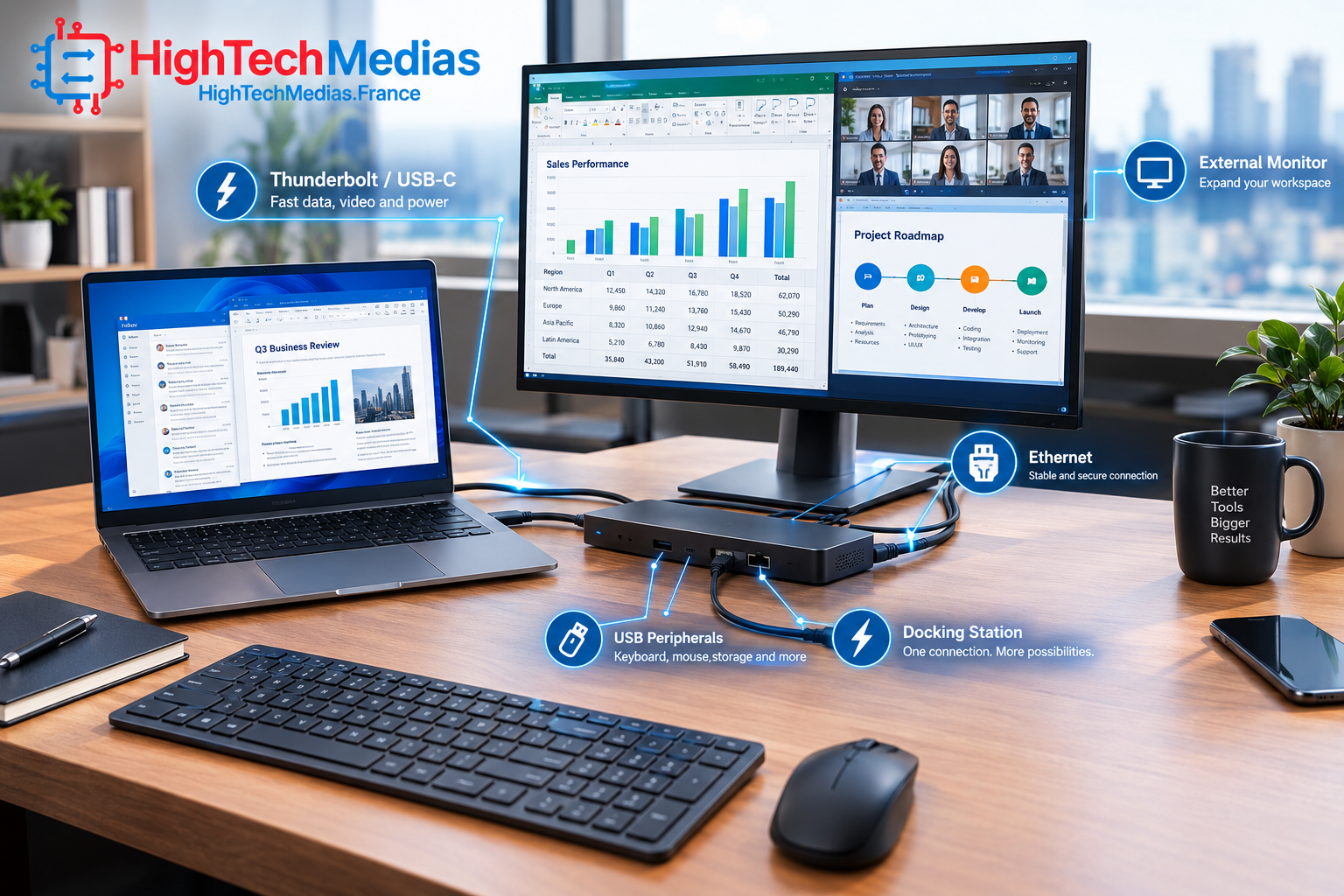
A business laptop often spends much of its life connected to accessories.
At the office, a single USB-C or Thunderbolt connection can potentially connect the laptop to a docking station, monitor, keyboard, mouse, network and other peripherals.
That makes connectivity particularly important.
A strong professional configuration should ideally provide some combination of:
- USB-C
- Thunderbolt 4
- USB-A
- HDMI
- Ethernet or docking support
- Headphone/microphone connectivity
- Optional smart-card reader
- Optional cellular connectivity
The ThinkPad T14 Gen 7 Intel, for example, includes two Thunderbolt 4 ports, HDMI, USB-A and Ethernet, with additional options depending on configuration.
The HP EliteBook 8 G2i documented configuration includes HDMI 2.1, two Thunderbolt 4 ports, USB-A and USB-C.
For a deeper explanation of connectors, read our Laptop Ports Explained.
9. Webcam and Audio Quality Are Now Business Essentials
Video conferencing is no longer an occasional feature.
For many professionals, the webcam is used every day for Microsoft Teams, Zoom, Google Meet and other collaboration platforms.
A good business laptop should therefore have:
- A sharp webcam
- Good microphone quality
- Noise reduction
- Useful low-light performance
- A privacy feature where available
- Good speaker placement
Some current premium business models now use 5MP cameras and IR capabilities, as seen on documented HP EliteBook 8 G2i configurations.
For professionals who spend hours in meetings, this can be more important than having an extremely high-end GPU.
10. Which Business Laptop Is Best for Different Users?
There is no single winner for every professional.
Best overall for traditional Windows business users: Lenovo ThinkPad T14 Gen 7
The T14 Gen 7 is particularly attractive for corporate workers, consultants, managers and organizations that value connectivity, durability, professional security and long-term deployment.
Best for small businesses: HP EliteBook 8 G2i 14
The EliteBook 8 G2i combines Windows 11 Pro, modern Intel Core Ultra processors, business security and warranty options in a compact 14-inch design.
Best for Apple-focused companies: MacBook Air or MacBook Pro
Apple’s Mac platform makes sense when employees already work within macOS and the organization’s software ecosystem supports it.
The MacBook Air remains particularly attractive for professionals who prioritize portability, battery efficiency and quiet operation.
Best for IT-managed fleets
Look closely at Intel vPro or AMD PRO configurations.
The value is not simply processor speed. Enterprise manageability can help IT teams remotely manage, maintain and secure larger numbers of devices. Intel specifically positions vPro around security, manageability, stability and professional deployment.
Best for demanding technical professionals
Developers, engineers, data analysts and content creators should prioritize:
- 32GB or more RAM
- Fast NVMe storage
- A stronger CPU
- High-quality display
- Good cooling
- Multiple external display support
- Appropriate discrete graphics when required
For these users, a thin-and-light business laptop is not always the best choice.
11. Business Laptop vs. Consumer Laptop
The difference becomes clearer when you look beyond the processor.
A consumer laptop may offer an excellent OLED screen, powerful CPU and attractive design at a competitive price.
A business laptop may instead prioritize:
- Security
- Fleet management
- Durability
- Serviceability
- Docking
- Long-term support
- Business warranties
- Professional operating-system options
That does not mean every business laptop is automatically better.
A freelance writer who works at home may be better served by a premium consumer laptop if enterprise security and fleet management are irrelevant.
On the other hand, a company purchasing 50 or 500 machines may value manageability and lifecycle support much more than an OLED display.
This is why the best laptops for business should be evaluated according to the actual working environment.
12. How Much Should You Spend?
For U.S. buyers in 2026, a reasonable business laptop budget can range widely.
Around $800–$1,000
Look for:
- 16GB RAM
- 512GB SSD
- Modern Core Ultra, Ryzen or equivalent processor
- 14-inch or 15/16-inch display
- Windows 11 Pro if required
Around $1,000–$1,500
This is the sweet spot for many professionals.
You can often find:
- Better displays
- Stronger processors
- Better webcams
- Better build quality
- More connectivity
- Larger SSDs
- Better security
- Business warranties
The HP EliteBook 8 G2i configuration documented at $1,349 is an example of this class, while Lenovo’s current T14 Gen 7 listings also fall into this general professional category depending on configuration.
$1,500 and above
At this level, you should expect a specific reason for spending more.
That could mean:
- Premium display
- 32GB or 64GB memory
- High-end processor
- Larger SSD
- Better security
- 5G connectivity
- Premium construction
- Mobile workstation capabilities
Do not spend $2,000 simply because a laptop has a more expensive processor if your daily workload consists primarily of email, Office applications and web-based software.
13. Business Laptop Buying Checklist
Before purchasing, use this checklist:
Performance
- Modern Intel Core Ultra, AMD Ryzen AI PRO or Apple silicon
- At least 16GB RAM
- 512GB SSD preferred
Security
- TPM 2.0
- Secure Boot
- Fingerprint or IR authentication
- Windows 11 Pro where required
- Enterprise security features if needed
Connectivity
- USB-C
- Thunderbolt 4 if needed
- USB-A
- HDMI
- Docking compatibility
- Ethernet directly or through a dock
Mobility
- Reasonable weight
- Good battery
- USB-C charging
- Wi-Fi 6E or Wi-Fi 7
Professional use
- Good webcam
- Good microphone
- Comfortable keyboard
- Durable chassis
- Appropriate warranty
If portability is your main concern, also read our Laptop Size and Weight Guide.
14. Frequently Asked Questions
What is the best laptop for business in 2026?
The Lenovo ThinkPad T14 Gen 7 is one of the strongest choices for traditional Windows professional users because of its combination of business features, connectivity, security options and current Intel Core Ultra processors. The HP EliteBook 8 G2i is another strong option, particularly for buyers who prioritize HP’s security and support ecosystem.
How much RAM should a business laptop have?
16GB is the practical minimum for most professionals in 2026.
Users working with large datasets, development environments, creative applications or heavy multitasking should consider 32GB or more.
Is Windows 11 Pro important for business?
It can be. Organizations using domain management, advanced security policies, enterprise deployment and professional administration should generally look for Windows 11 Pro or an appropriate enterprise edition.
Is an NPU important in a business laptop?
An NPU can accelerate supported AI workloads locally, but its value depends on the software you actually use. Do not buy a laptop solely because it advertises a high NPU TOPS number.
Is Intel better than AMD for business laptops?
Neither is automatically better. Intel offers strong business platforms including vPro, while AMD offers Ryzen AI PRO and AMD PRO technologies. The specific laptop’s security, battery, cooling, warranty and configuration can matter more than the processor brand.
Are MacBooks good business laptops?
Yes, particularly for organizations that use macOS and Apple’s software ecosystem. Companies should verify compatibility with required Windows applications, device management systems and internal IT policies before deployment.
Should I buy a 14-inch or 16-inch business laptop?
A 14-inch model is usually better for mobility, while a 16-inch laptop provides more screen space for spreadsheets, development and multitasking. The right choice depends on whether portability or workspace matters more.
15. Final Verdict
The best laptops for business in 2026 are not necessarily the machines with the most impressive specification sheets. The strongest professional systems combine performance with security, reliability, connectivity, battery life, comfortable keyboards, good webcams and long-term support.
The Lenovo ThinkPad T14 Gen 7 stands out as a particularly strong choice for traditional Windows professionals and organizations that need a versatile enterprise-oriented machine. Its current Intel Core Ultra platform, professional connectivity, Windows 11 Pro options and business-focused design make it a well-rounded choice.
The HP EliteBook 8 G2i 14 is an equally compelling option for buyers who prioritize HP’s business security ecosystem, modern Intel Core Ultra processors, Wi-Fi 7, Thunderbolt 4 and professional support options. Its recently documented $1,349 U.S. configuration also puts it directly into an important price range for small businesses and individual professionals.
Ultimately, your workload should determine your purchase. A professional who primarily uses Microsoft 365 does not need the same hardware as a software developer, financial analyst, engineer or video editor.
Before making your decision, compare the actual configuration—not just the laptop family name—and pay particular attention to RAM, SSD capacity, display quality, battery capacity, operating system, security features and warranty.
For a broader selection of affordable options, explore our Best Laptops Under $1,000 in 2026 and Best Laptops Under $700 in 2026 guides.
For professionals who want to understand the alternatives to a laptop, our Mini PCs vs. Laptops comparison is also worth reading.
Bottom line: for most Windows professionals, start with the Lenovo ThinkPad T14 Gen 7 and HP EliteBook 8 G2i, then choose the configuration that best matches your workload, security requirements and budget rather than paying for specifications you will never use.



Comments (2)
[…] review the best laptops for programming in 2026 for developer-focused alternatives, or compare best laptops for business in 2026 if your priority is professional […]
[…] For a wider look at home-office technology, read our guides to the best laptops for remote work and the best laptops for business. […]