
Ninkear A15 Plus Review: Ryzen 7 Performance & Battery Life
When friends or colleagues ask me which laptop they should buy for work or school on a limited budget, I often suggest looking beyond the biggest and most familiar brands. There are several newer laptop manufacturers offering competitive hardware at lower prices.
The Ninkear A15 Plus is one such example. This 15.6-inch laptop combines an AMD Ryzen 7-5825U processor, 32GB of DDR4 RAM, and a 1TB SSD, making it an interesting option for everyday productivity, schoolwork, office applications, and other demanding tasks that benefit from plenty of memory.
Before recommending it, however, we wanted to take a closer look at the hardware. We tested the laptop, checked its performance and battery life, examined the display, and opened the chassis to see how Ninkear handled the internal components and cooling system.
Here is what we found.
Ninkear A15 Plus Specifications
The main specifications of our Ninkear A15 Plus configuration are:
- Model: Ninkear A15 Plus
- Display: 15.6-inch IPS, 1920 × 1080 resolution
- Brightness: Approximately 250–260 nits
- Processor: AMD Ryzen 7-5825U
- Graphics: Integrated AMD Radeon Graphics
- Memory: 32GB DDR4-3200
- Storage: 1TB SSD
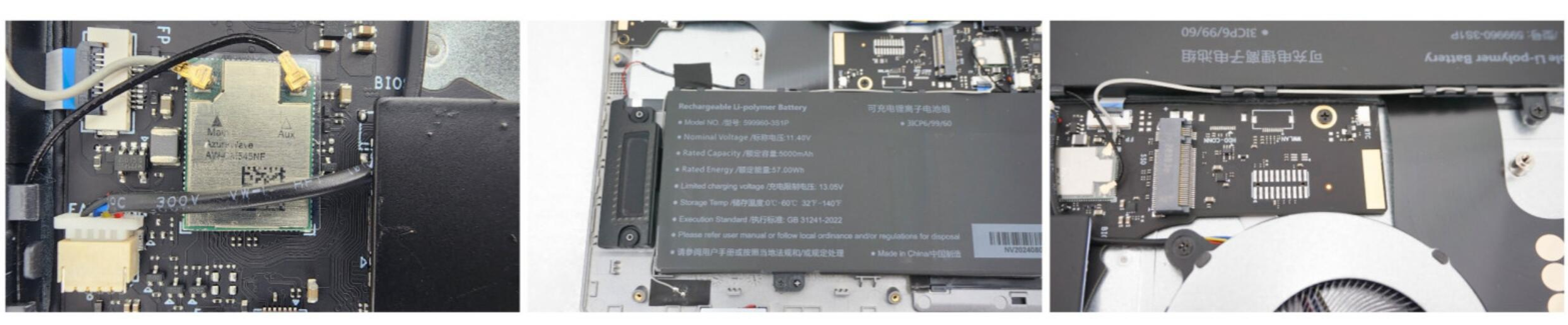
- Battery: 57Wh (5,000mAh)
- Wireless: Wi-Fi 5, dual-band 2.4GHz/5GHz
- Bluetooth: Bluetooth 5.0
- Ports: HDMI, USB-C, three USB-A ports, audio jack, and MicroSD card reader
- Keyboard: Full-size keyboard with numeric keypad and backlight
- Security: Fingerprint scanner
- Operating system: Windows 11 Pro
- Weight: Approximately 1.7 kg (3.75 lbs)
- Dimensions: Approximately 36 × 23 × 1.8 cm
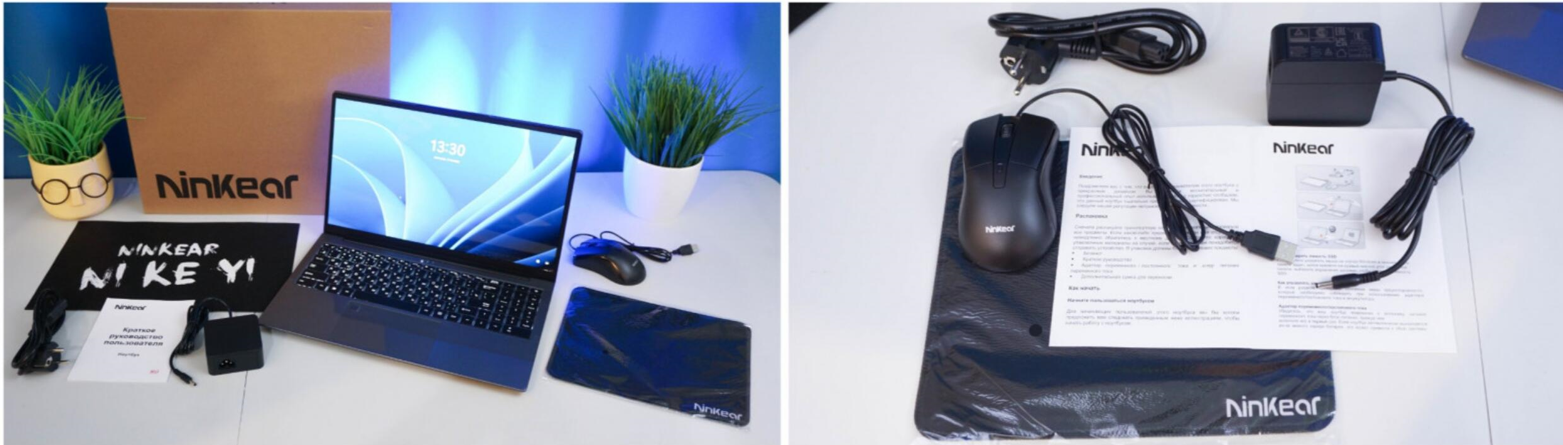
The laptop also comes with a DC power adapter, mouse, mouse pad, and user manual.
Design and Portability
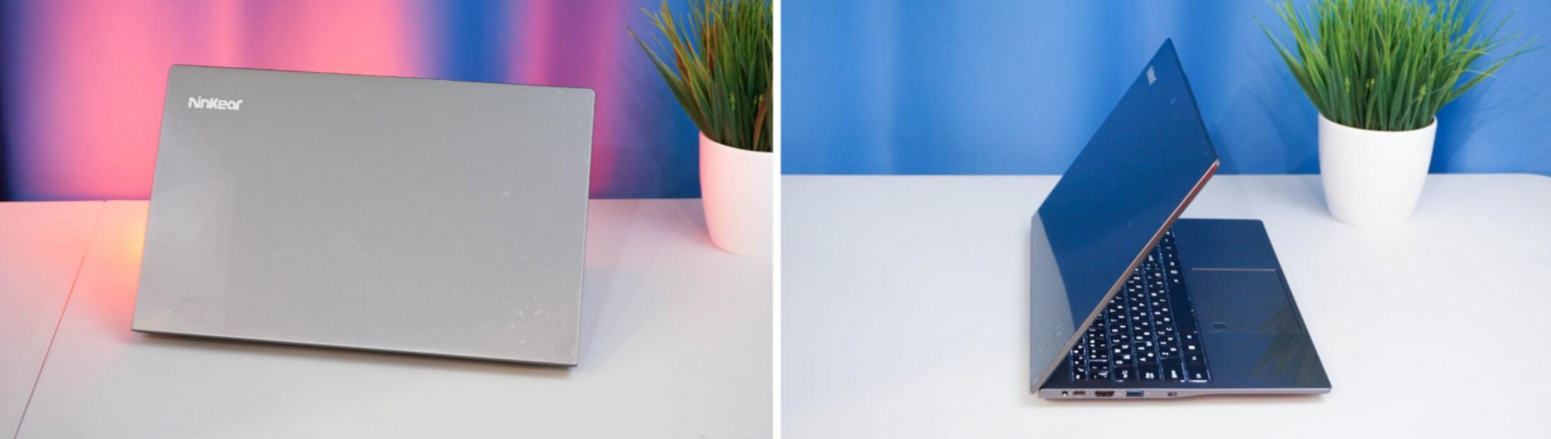
The A15 Plus has the familiar design of a 15-inch productivity laptop. At around 1.7 kg (3.75 lbs), it is not an ultra-light model, but it is still easy enough to carry in a backpack or laptop bag.
If portability is one of your priorities, our laptop size and weight guide explains how dimensions and weight can affect everyday use and travel.
The chassis measures approximately 36 × 23 × 1.8 cm, giving it a relatively practical footprint for a 15.6-inch laptop.
This is not a gaming-focused design. Instead, Ninkear has clearly positioned the A15 Plus as an everyday work and study machine.
For office applications, web browsing, documents, video calls, media consumption, and general productivity, that approach makes sense.
Display
The A15 Plus uses a 15.6-inch IPS display with a 1920 × 1080 resolution.
During our testing, brightness measured approximately 250–260 nits at 100% brightness. Viewing angles were decent, and we did not observe visible flickering during our testing.
The panel is identified as an AUO5799 A156HAN01.0, using an IPS LCM WLED eDP 30-pin configuration. The panel was manufactured by Shenzhen Tunan Optoelectronics Co., Ltd.
One limitation is color coverage. The display provides approximately 50% NTSC color reproduction. At around 1.7 kg (3.75 lbs), it is not an ultra-light model, but it is still easy enough to carry in a backpack or laptop bag. If portability is important to you, our laptop size and weight guide explains how a laptop’s dimensions and weight can affect everyday use and travel.
That is adequate for everyday productivity, web browsing, video playback, and casual entertainment. However, users working professionally with photography, graphic design, color grading, or other color-sensitive applications should consider a laptop with a wider-gamut display, such as a panel offering close to 100% NTSC or a comparable wide-color-gamut specification.
The display can also be useful when showing content to colleagues. Its relatively large 15.6-inch screen makes it practical for small presentations or demonstrations.
The standard refresh rate is 60Hz. When connected to a compatible external monitor, our setup supported refresh rates of up to 100Hz.
Ports and Connectivity
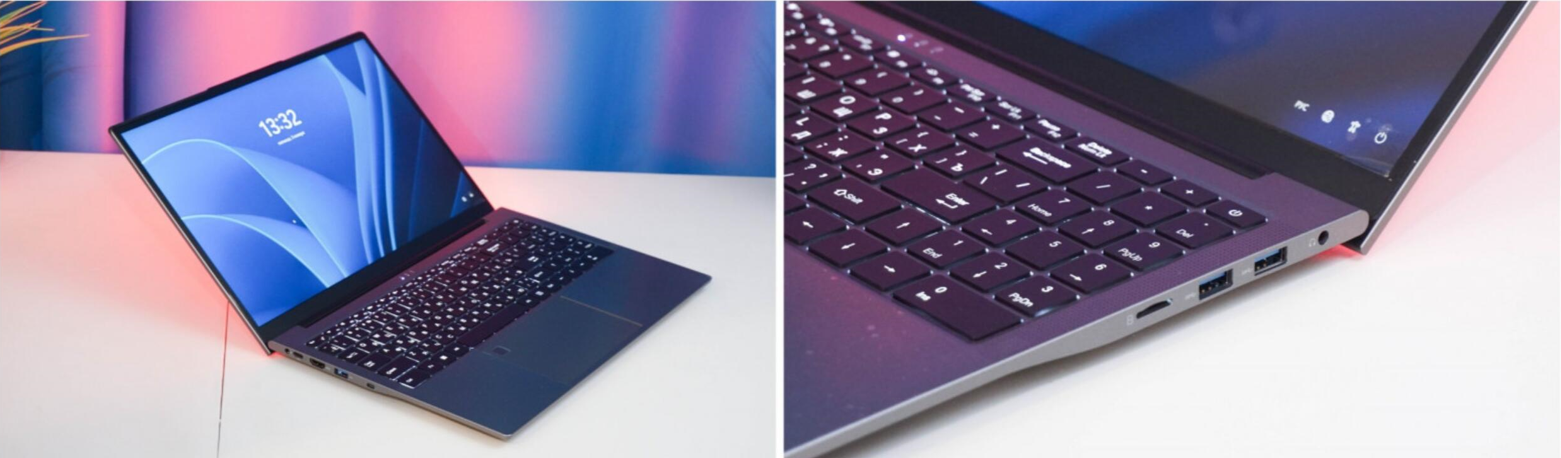
One of the A15 Plus’s practical advantages is its selection of ports.
The laptop includes:
- One USB-C port
- Three USB-A 3.0 ports
- HDMI
- Headphone/audio connectivity
- MicroSD card reader
The USB-A ports are distributed across both sides of the laptop, while the USB-C port is located on the left side.
The USB-C port can be used for connecting storage devices and external displays, and the laptop also supports charging through USB-C.
There is also a standard round DC charging port, so users have the choice of using the included charger or compatible USB-C charging equipment.
The built-in MicroSD card reader is another useful feature. It allows users to access MicroSD cards without carrying a separate adapter, which can be particularly convenient for photographers, content creators, and anyone who regularly works with removable storage.
With both HDMI and USB-C display connectivity, the laptop can also be connected to external monitors.
Keyboard and Touchpad
The A15 Plus has a full-size keyboard with a dedicated numeric keypad, which is useful for spreadsheets, accounting, data entry, and office work.
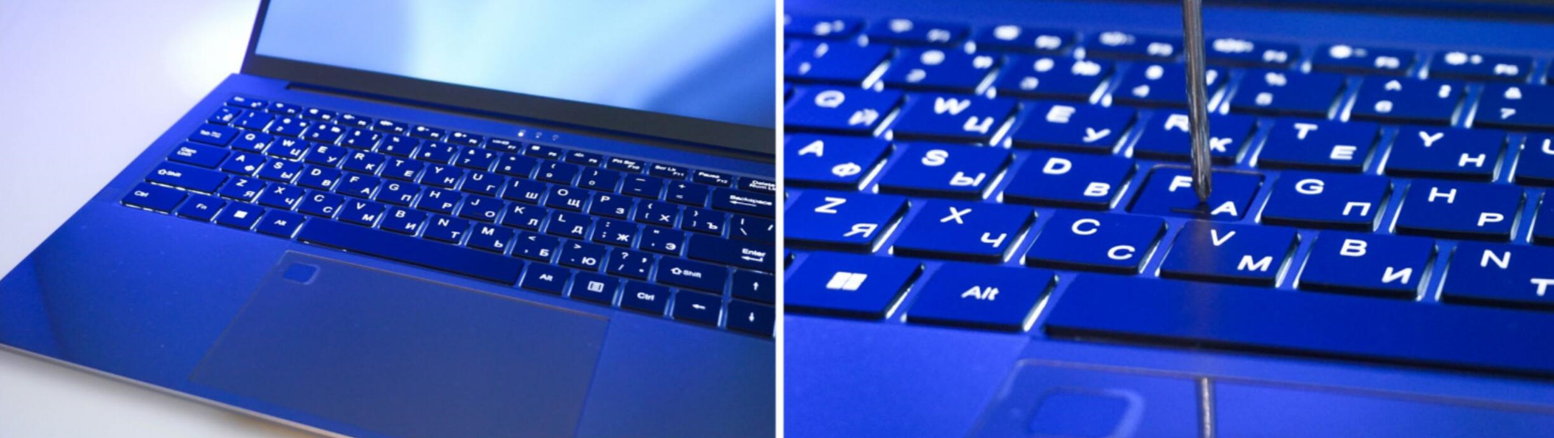
The A15 Plus has a full-size keyboard with a dedicated numeric keypad, which is useful for spreadsheets, accounting, data entry, and office work.
The keyboard includes a backlight with adjustable intensity. During our use, the keys had a relatively short and clear travel, and we did not notice unusual flexing or distracting keyboard noise.
The touchpad supports standard multi-finger gestures and worked properly during our testing.
A fingerprint reader is integrated into the touchpad area, providing another convenient way to sign in to Windows.
Webcam and Video Calls
The laptop includes a basic 720p webcam.
It is not designed to compete with premium laptop webcams, but it is suitable for everyday video conferencing through applications such as Zoom, Skype, and similar services.
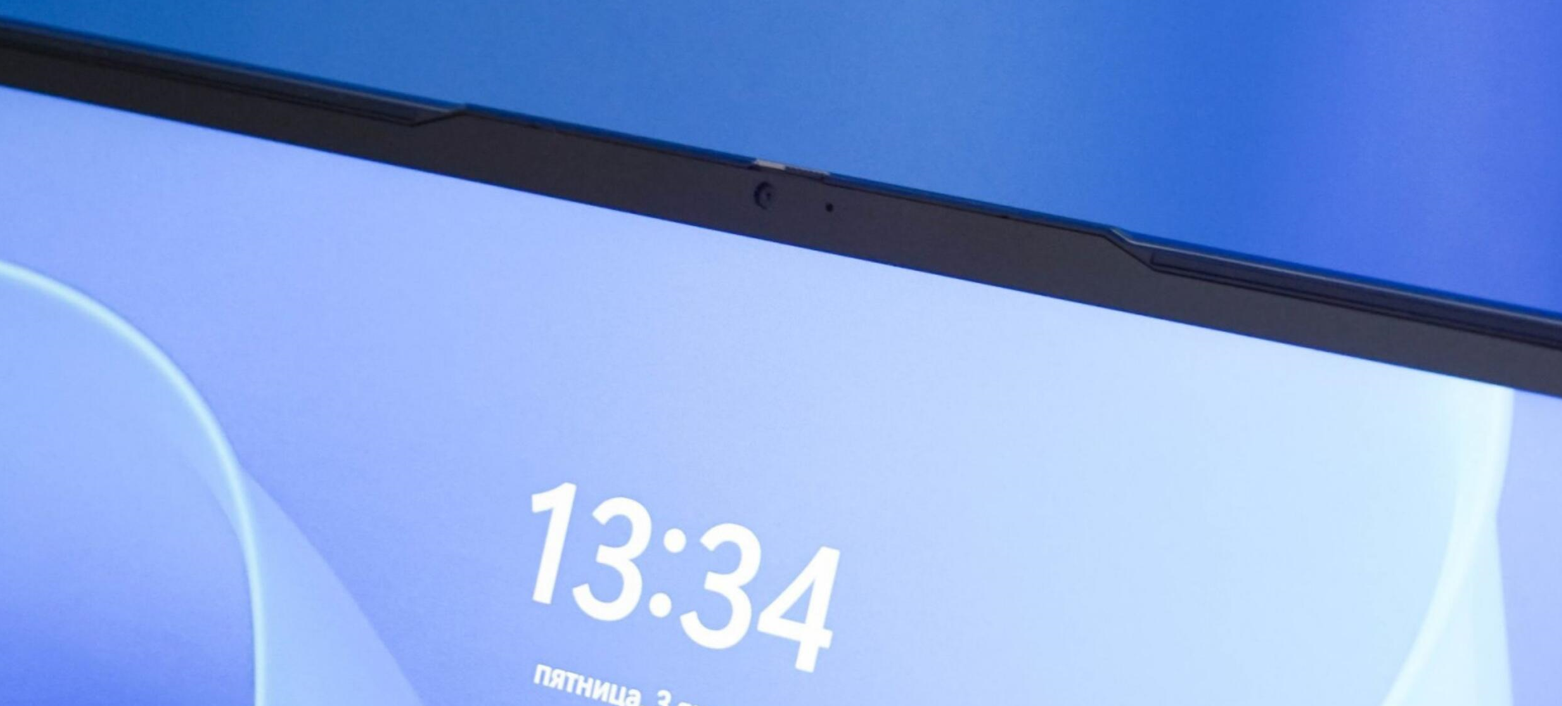
For users who frequently create professional video content or participate in high-quality video meetings, an external webcam would provide a better experience.
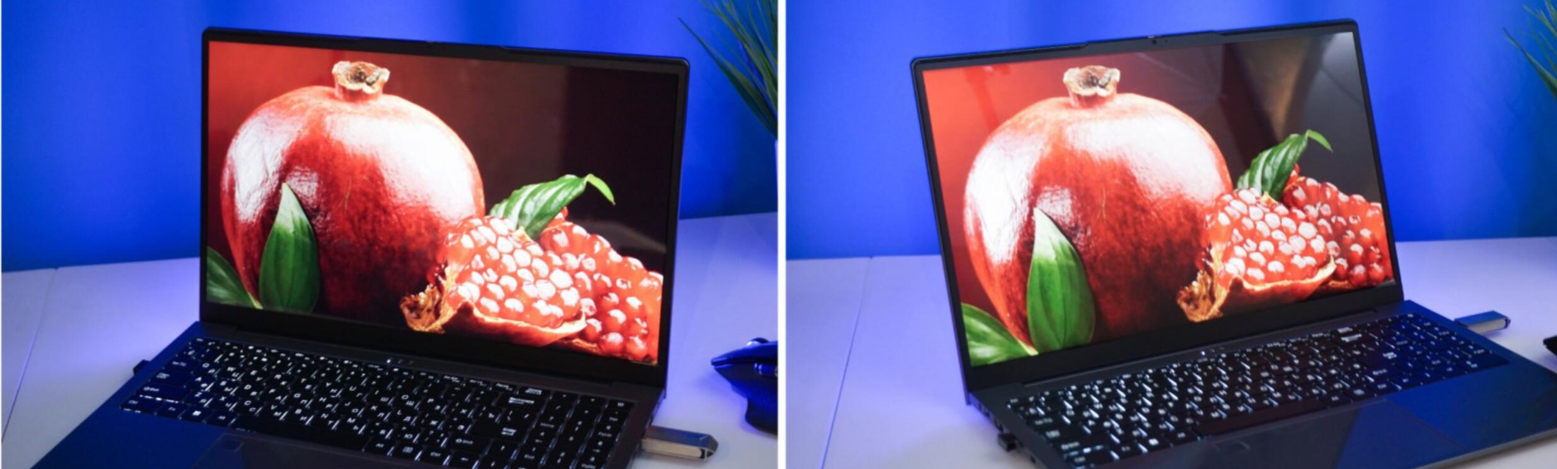
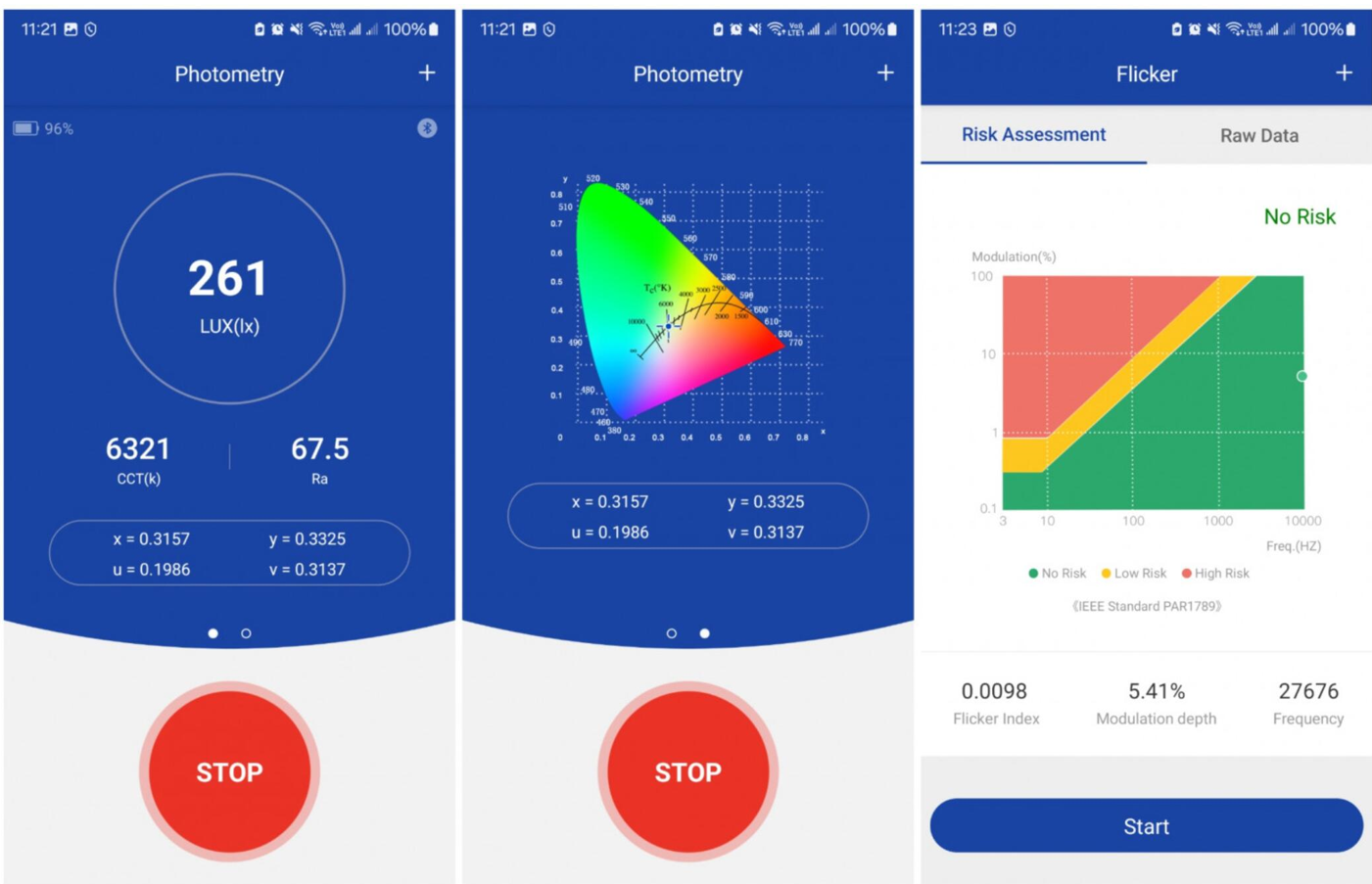
Measured brightness of 250-260 nits at 100% backlight level. There is no flickering, which is already good.
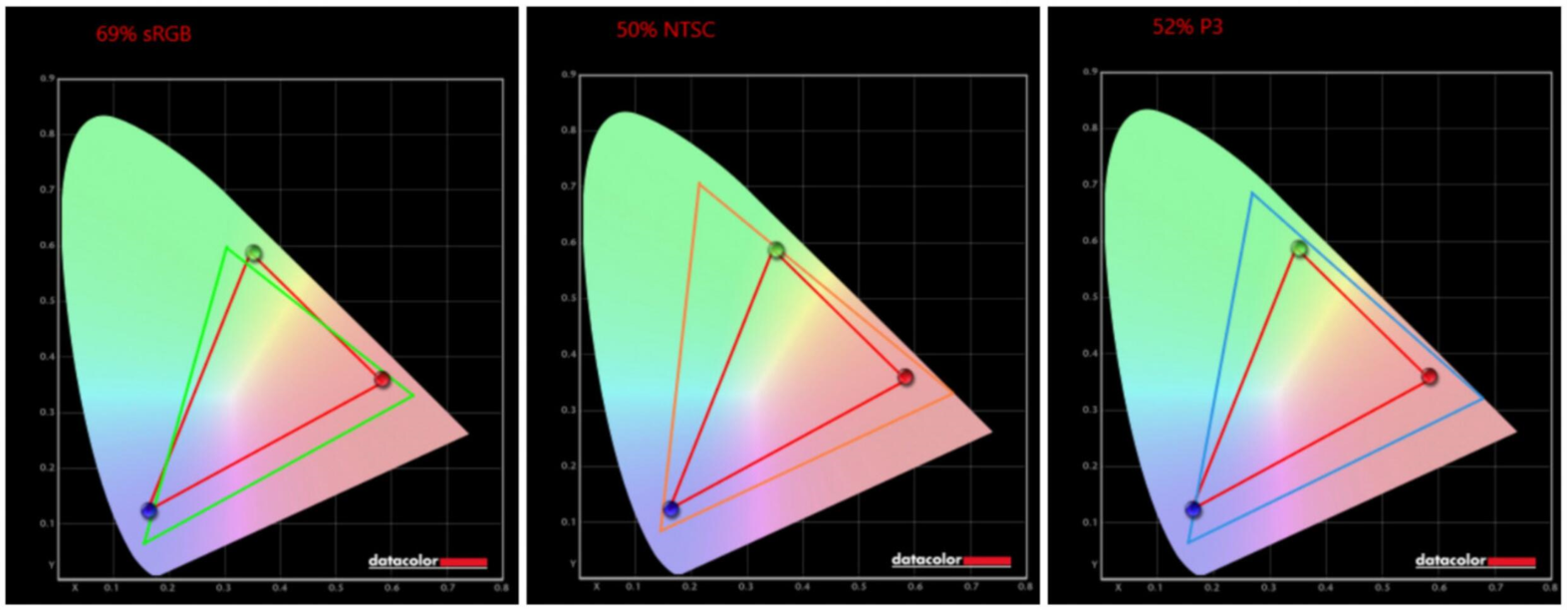
For basic work, such a matrix is enough for the head, for entertainment and games too. For professional work with graphics and models, it is better to choose a different laptop model (I usually advise with 100% NTSC).
Windows 11 Pro
Our test unit came with Windows 11 Pro preinstalled.
We did not encounter driver problems during our testing. Ninkear also provides drivers through its official support resources if users need to reinstall or update them.
The combination of Windows 11 Pro and 32GB of RAM makes the A15 Plus suitable for a broad range of productivity applications.
Memory and Storage
The laptop is equipped with 32GB of DDR4-3200 memory.
The memory operates in dual-channel mode, which is useful for overall system performance. The Samsung memory chips used in our test unit are also a positive hardware choice.
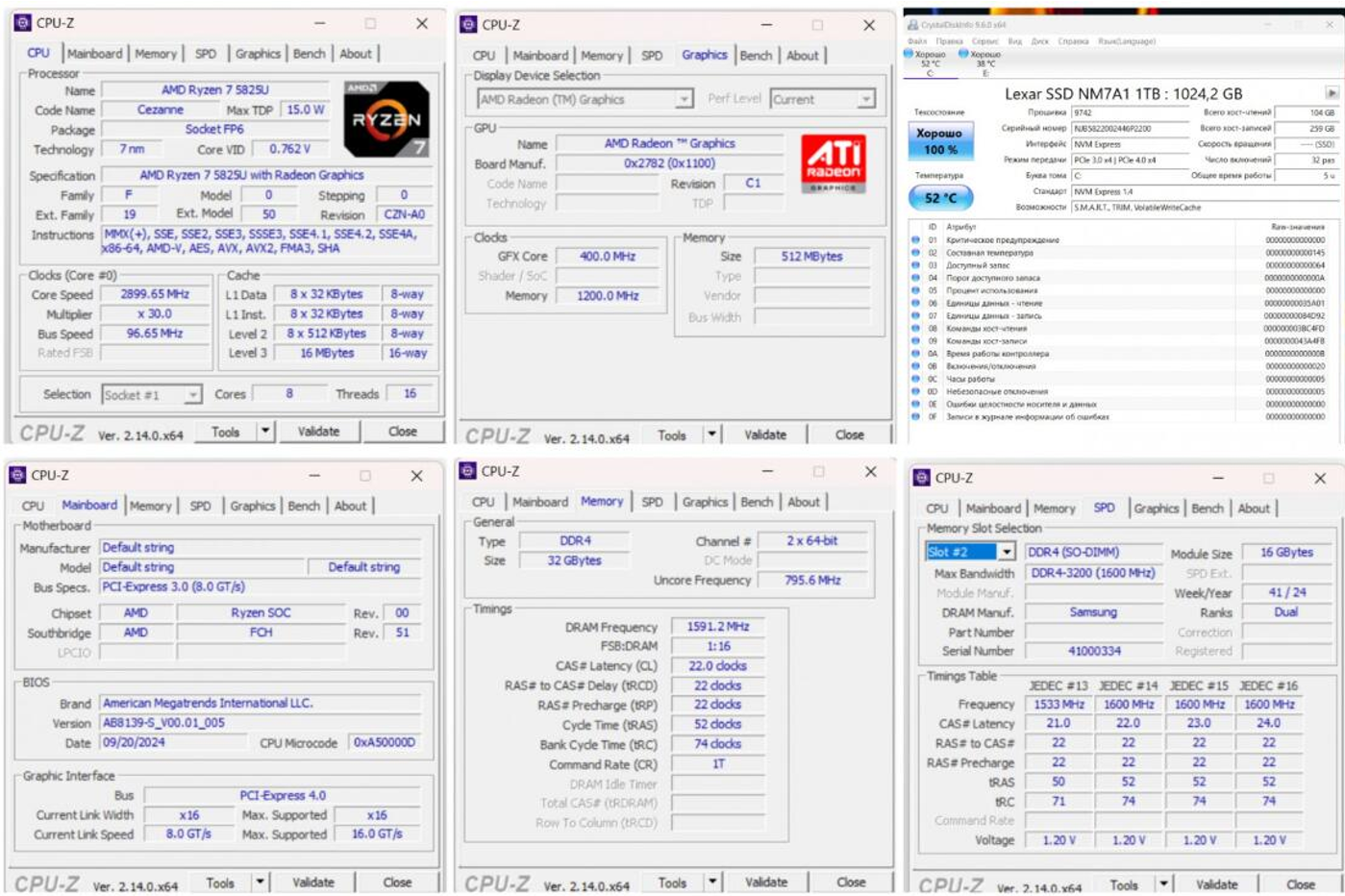
Storage is provided by a 1TB Lexar NM7A1 SSD.
Our testing indicated that the system drive operates through a PCIe 3.0 x4 interface, with sequential performance reaching approximately 3,500 MB/s in our tests.
The SSD itself uses a Maxio MAP1602 controller, which supports PCIe 4.0 x4, although the laptop’s implementation limits the drive to the PCIe 3.0 interface.
Another useful feature is the presence of a second M.2 slot, giving users the option of adding another SSD if they need additional storage.
That is particularly useful for people who work with large files, video projects, CAD applications, games, or other storage-intensive workloads.
Processor and Performance
The Ninkear A15 Plus is powered by the AMD Ryzen 7-5825U, an eight-core mobile processor based on AMD’s Zen 3 architecture and manufactured using TSMC’s 7nm process.
If you are comparing AMD and Intel processors when shopping for a laptop, our laptop processor guide covers the main differences between today’s major laptop CPU platforms.
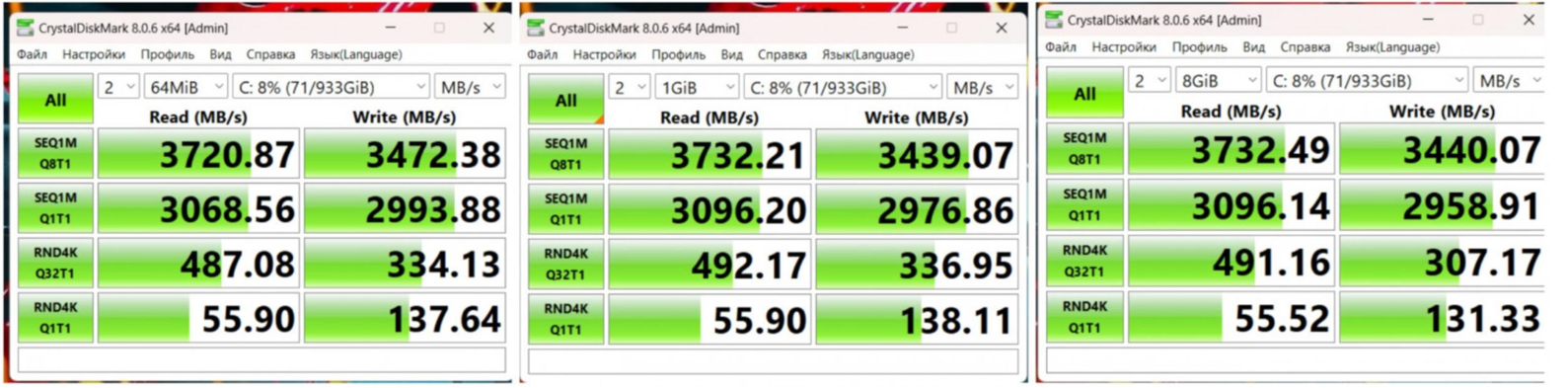
In our benchmark testing, performance was broadly in line with what we would expect from a Ryzen 7-5825U laptop.
For everyday productivity, the hardware has more than enough capability for applications such as Microsoft Office, web browsing, video conferencing, document editing, and multitasking.
The combination of the Ryzen 7 processor and 32GB of RAM also gives the A15 Plus additional headroom for heavier applications, including audio and video editors, graphics applications, modeling software, and various CAD programs.
Compared with some older laptops using processors such as the Intel Core i7-1165G7, the Ryzen 7-5825U platform can offer an interesting performance profile in this price range. However, buyers should remember that newer processors are available if they are willing to spend more.
Integrated Graphics and Gaming
Because the A15 Plus uses integrated AMD Radeon Graphics, it is not intended to be a high-end gaming laptop.
It can handle many games at low to medium graphics settings, depending on the title and resolution.
For casual gaming, older games, esports titles, and less demanding applications, the integrated GPU can be useful. Users looking for modern AAA gaming at high settings should instead consider a laptop with a dedicated graphics processor.
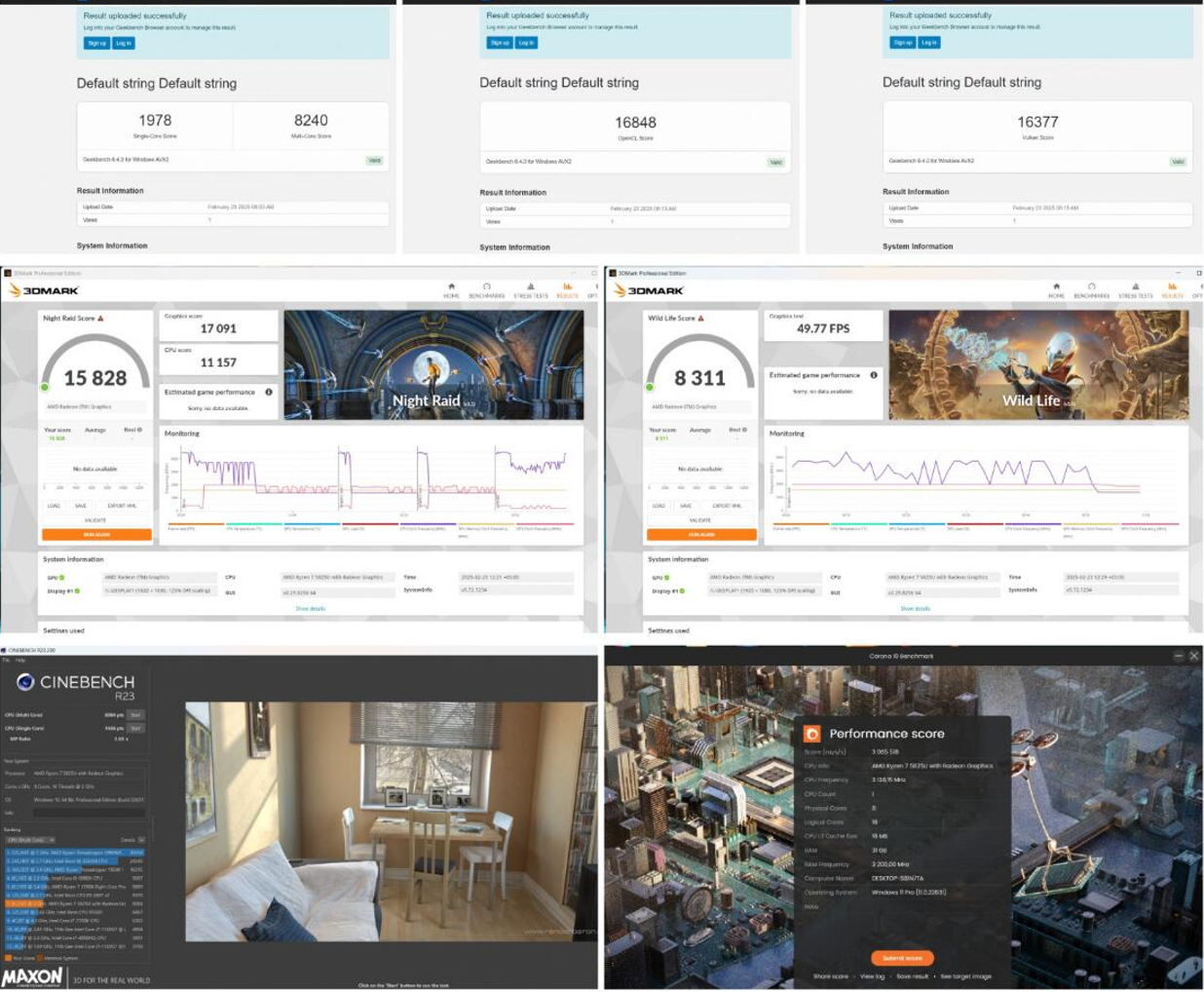
For everyday entertainment, the A15 Plus is perfectly capable. Video playback is handled without difficulty, and the built-in stereo speakers are adequate for general use.
The HDMI output also makes it easy to connect the laptop to a larger external display or TV.
Battery Life
Battery life was one of the strongest results from our testing.
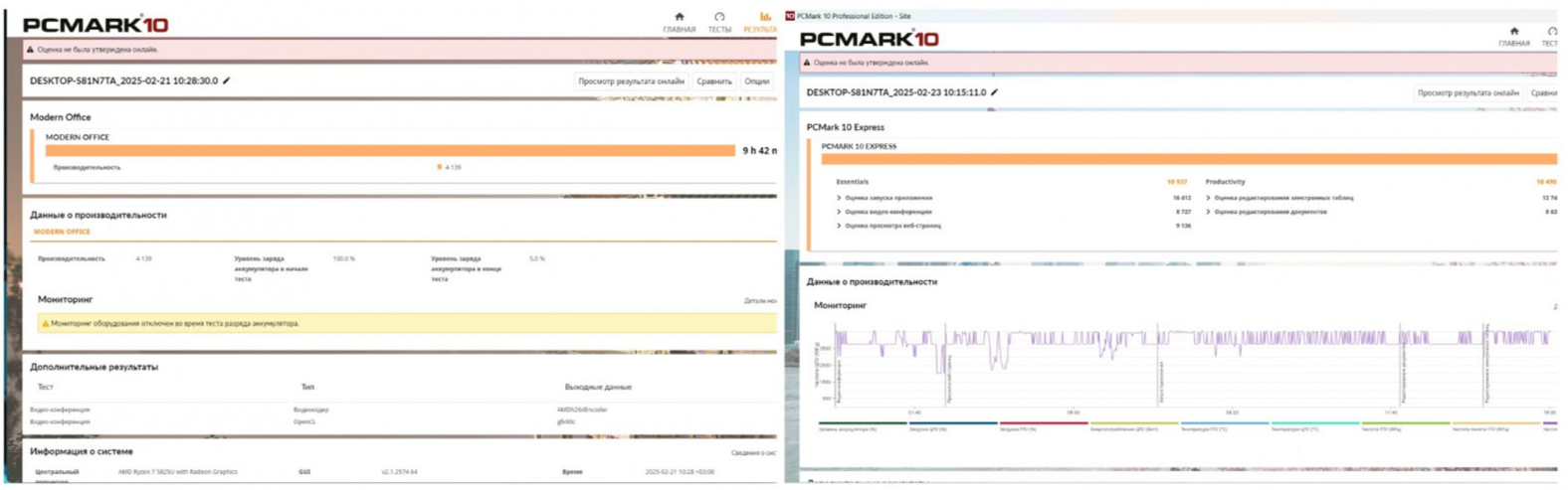
The A15 Plus has a 57Wh battery, and under a continuous workload in balanced mode, our test unit lasted approximately 9 hours and 42 minutes, reaching around 5% remaining battery capacity. The display provides approximately 50% NTSC color reproduction.
That is an impressive result for a laptop in this class, particularly for users who regularly work away from a power outlet.
If you’re comparing different laptop screens, our laptop display guide explains the differences between IPS and OLED displays and what to consider when choosing a screen.
Battery life can be extended further by reducing display brightness and using a more power-efficient mode such as Eco mode.
For students, office workers, and professionals who frequently work away from their desks, battery endurance can be just as important as raw processor performance.
Cooling and Thermal Performance
We also ran an extended stress test to examine how the A15 Plus handles sustained workloads.
After approximately one hour of stress testing, the laptop remained stable. We did not observe obvious thermal throttling or problematic processor temperatures.
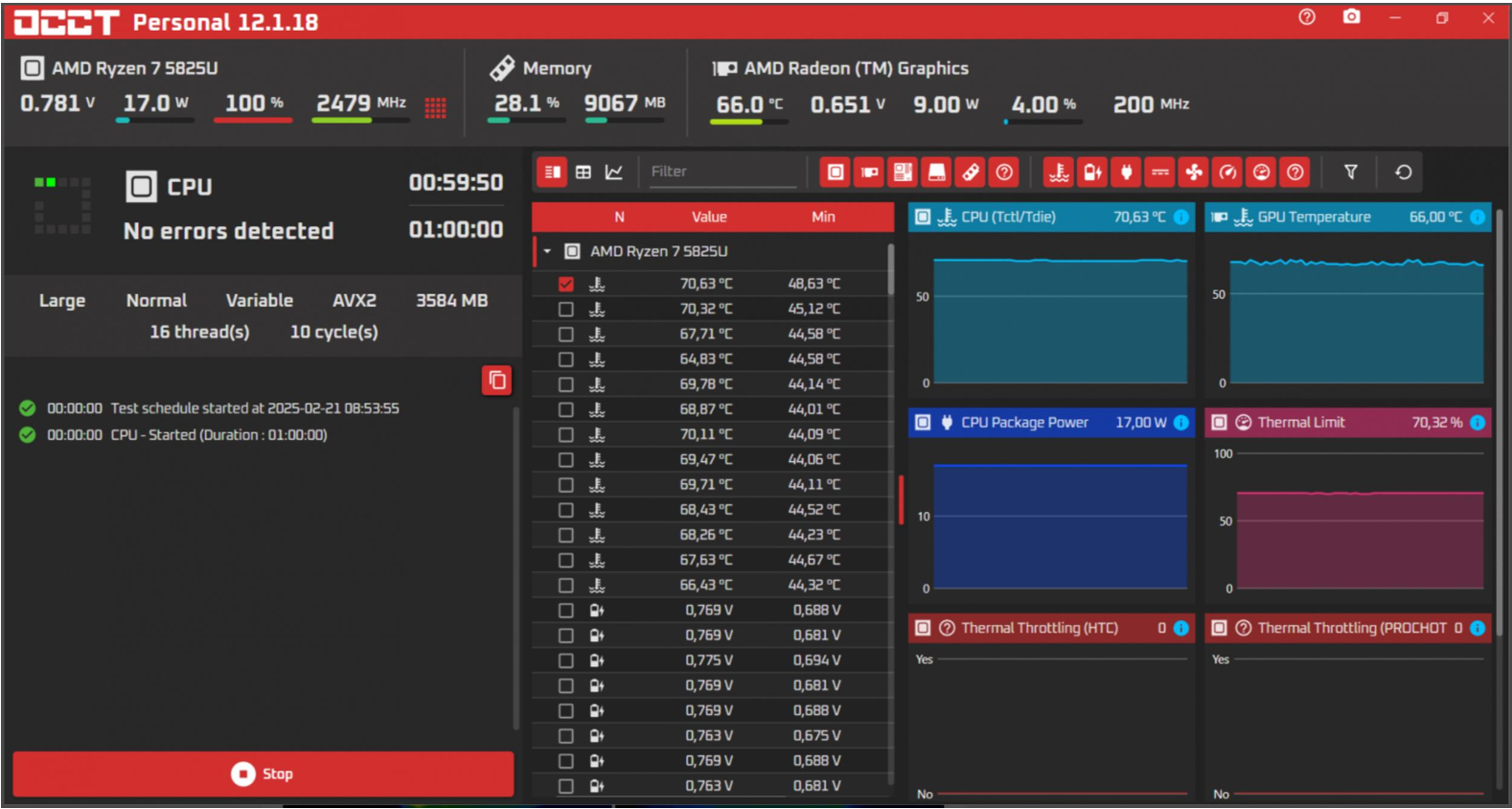
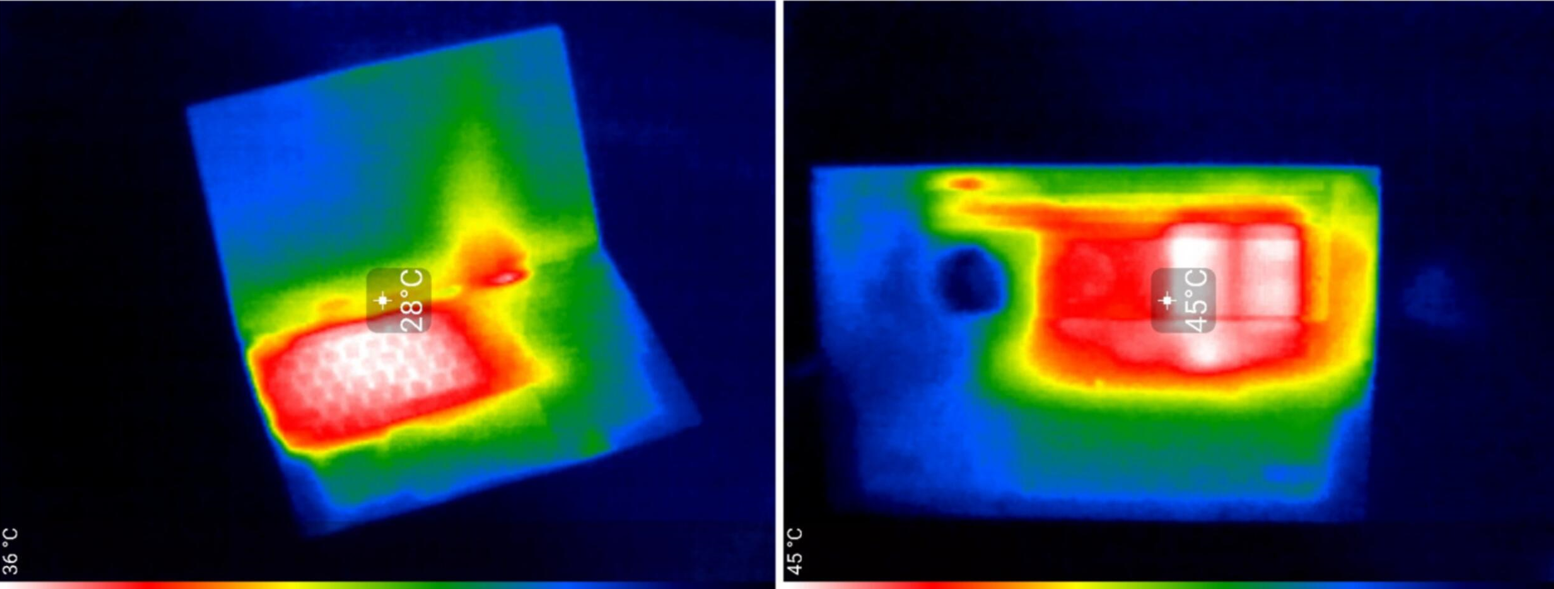
The processor temperature reached approximately 75°C or higher during the test, while external chassis temperatures exceeded 45°C in some areas.
The Ryzen 7-5825U has a configurable TDP range of approximately 15W to 25W. During our testing, processor power reached around 17W.
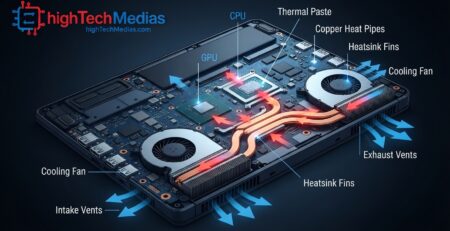
The cooling system uses two heat pipes and a single fan, which is a fairly conventional solution for this processor and laptop class.
There is, however, one noticeable downside: fan noise at maximum performance.
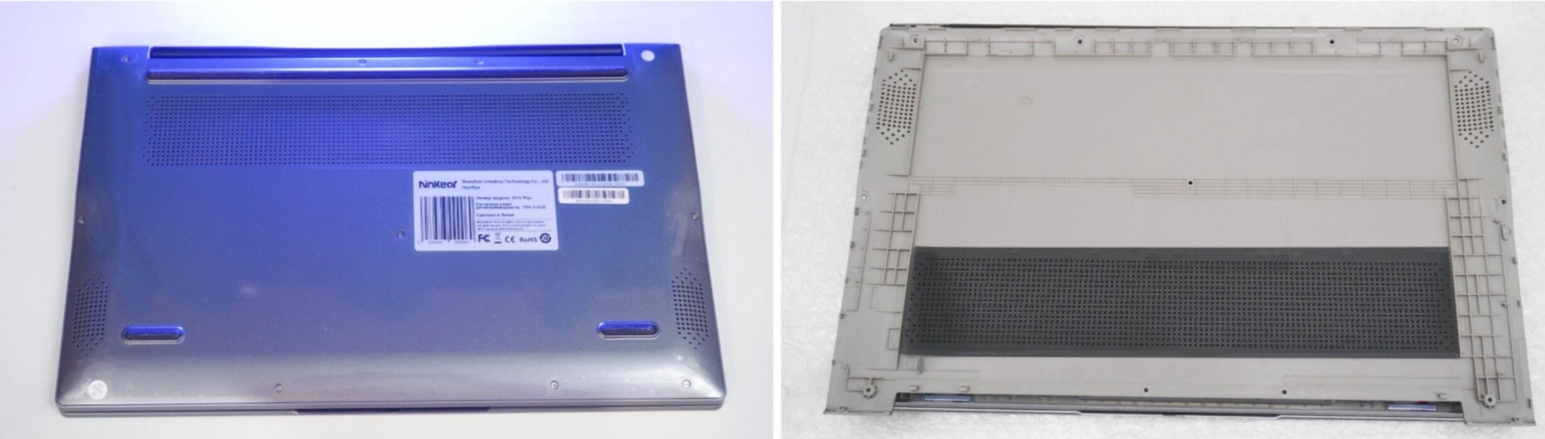
After removing the back cover, we found a plastic panel with a mesh layer designed to help keep small debris and dust out. However, there is no additional shielding around the individual components, and the SSD does not have a dedicated cooling solution.
The processor is cooled by two heat pipes and a single fan. This is a fairly typical cooling solution for a laptop in this price range and for this particular processor.
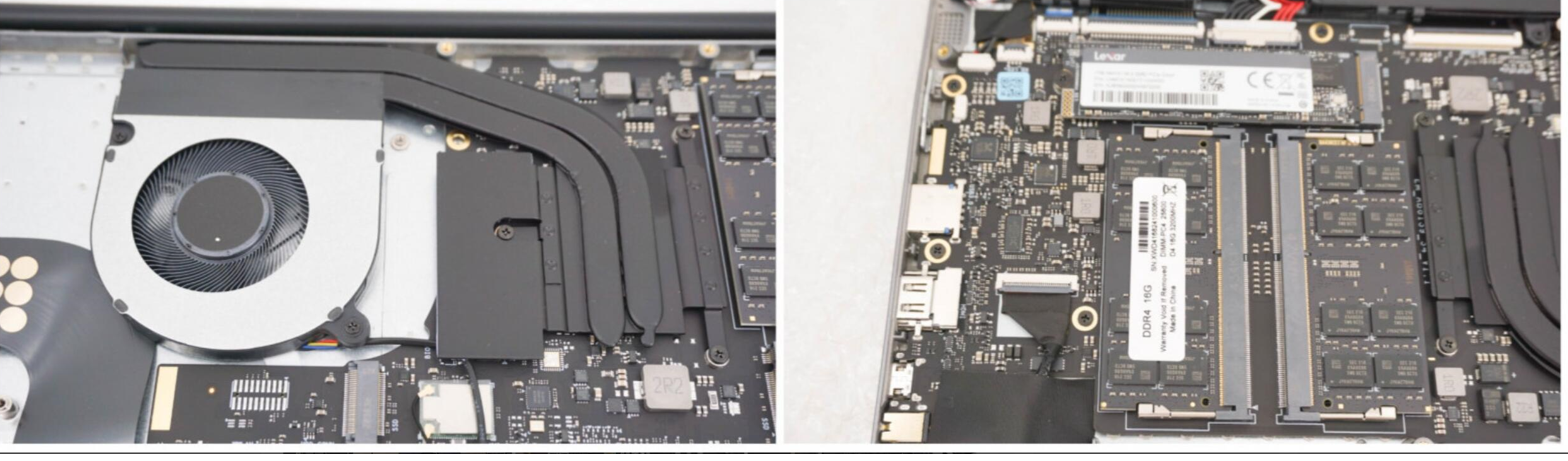
The system drive is a 1TB Lexar NM7A1 SSD, equipped with a Maxio MAP1602 controller and supporting a PCIe 4.0 x4 interface.

The second M.2 slot is occupied by a Realtek 8821CE wireless LAN module, which supports 802.11ac dual-band Wi-Fi on both the 2.4 GHz and 5 GHz bands.
Who Is the Ninkear A15 Plus For?
The A15 Plus makes the most sense for users who need a practical laptop with plenty of memory and storage without moving into the premium price category.
If you are still comparing different laptop configurations and price ranges, our laptop buying guide can help you identify the specifications that matter most before making a purchase.
The 32GB of RAM is especially useful for people who regularly keep many applications and browser tabs open or work with demanding productivity software.
It can also be suitable for:
- Office productivity
- School and university work
- Web browsing
- Video conferencing
- Programming
- Light content creation
- Audio and video editing
- CAD and modeling applications
- Casual gaming
- Media consumption
The integrated Radeon graphics are the main limitation for graphics-intensive gaming and professional 3D workloads.
Likewise, the display’s approximately 50% NTSC color coverage makes it less suitable for professional color-critical work.
Pros and Cons
Pros
- AMD Ryzen 7-5825U processor
- 32GB DDR4-3200 RAM
- 1TB SSD
- Second M.2 slot for storage expansion
- Nearly 10 hours of battery life in our test
- USB-C charging support
- HDMI and USB-C display connectivity
- MicroSD card reader
- Full-size keyboard with numeric keypad
- Backlit keyboard
- Fingerprint reader
- Windows 11 Pro
- Practical design for work and school
Cons
- Display offers only around 50% NTSC color coverage
- Integrated graphics limit demanding gaming performance
- Fan becomes noticeably louder under heavy workloads
- Display brightness is around 250–260 nits
- SSD performance is limited by the laptop’s PCIe 3.0 x4 implementation
Final Verdict
The Ninkear A15 Plus is a practical productivity laptop that focuses on useful hardware rather than unnecessary extras.
Its combination of an AMD Ryzen 7-5825U processor, 32GB of RAM, and a 1TB SSD gives it enough capability for office work, school, multitasking, programming, content creation, and a range of professional applications.
The ability to add a second M.2 SSD is another useful feature, particularly for users who need more storage over time.
Battery life was another highlight of our testing. With a result of approximately 9 hours and 42 minutes under a continuous workload, the A15 Plus can be a practical choice for people who spend significant time working away from an outlet.
The main compromises are the display and integrated graphics. The approximately 50% NTSC color coverage is fine for everyday use but not ideal for professional photo or graphics work. Similarly, the integrated Radeon graphics are better suited to casual gaming and less demanding titles than modern AAA gaming at high settings.
Fan noise is another consideration under sustained heavy workloads, although the laptop remains relatively quiet during lighter tasks.
Overall, our testing shows that the Ninkear A15 Plus is designed primarily as a work and study laptop with a strong focus on memory, storage, connectivity, and battery life.
If you are interested in another Ninkear system with a different form factor, you can also read our review of the Ninkear S13 2-in-1. For users with a practical budget who need a capable everyday machine rather than a dedicated gaming or professional graphics laptop, its hardware configuration makes it an interesting option to consider.






Leave a Reply