
Laptop Size and Weight Guide: How to Choose the Right Laptop
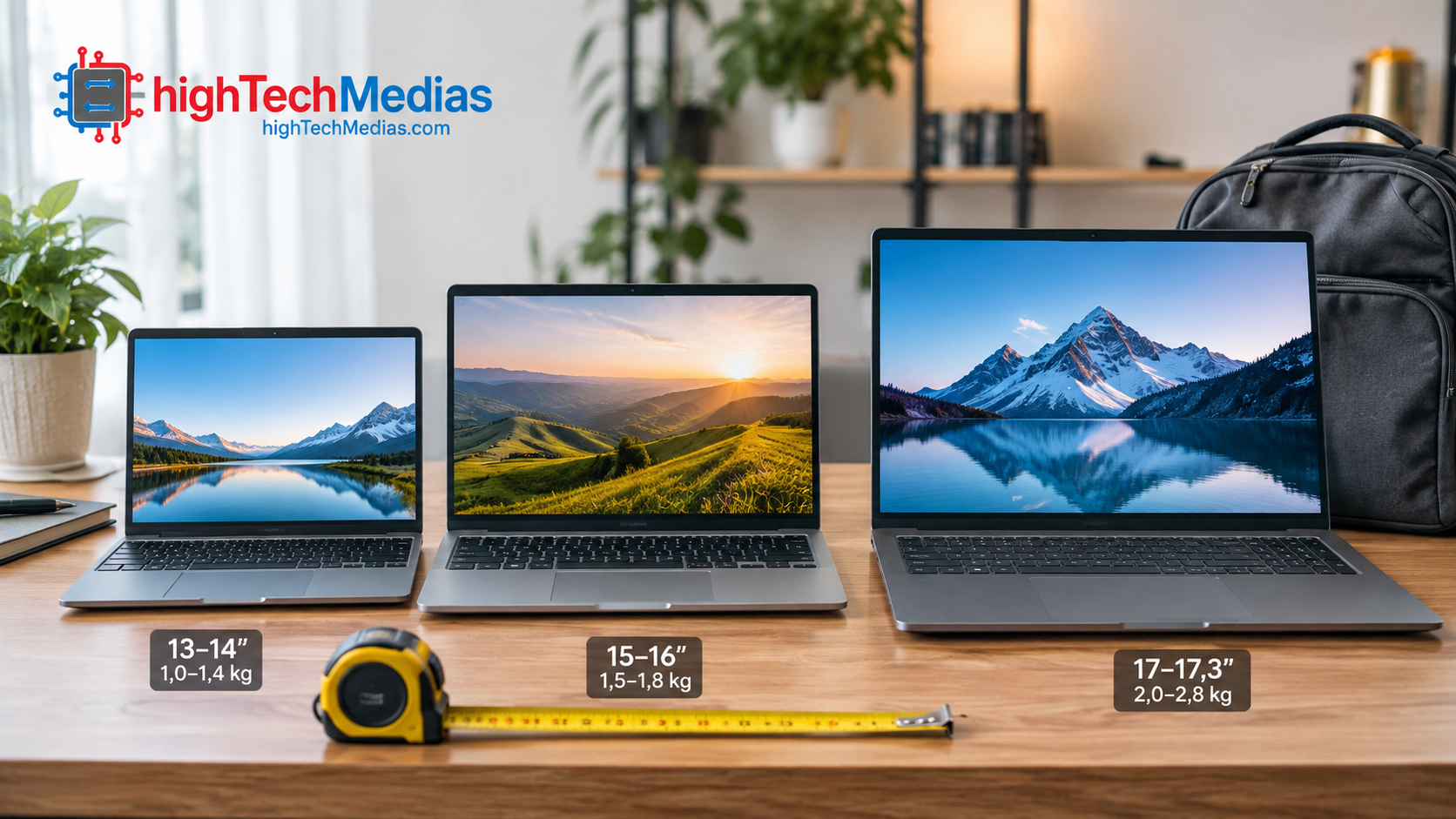
Laptop size and weight affect your daily comfort as much as the processor, RAM, storage or display resolution. A lightweight 13- or 14-inch laptop is ideal for frequent travelers, while a larger 15- or 16-inch model gives you more screen space for spreadsheets, multitasking, creative work and entertainment.
Quick answer: For most people, a 14-inch laptop weighing 1.2–1.6 kg (2.6–3.5 lb) offers the best balance of laptop size and weight. Choose a 13-inch model under 1.3 kg (2.9 lb) if you travel often, and a 15- or 16-inch model (1.8 kg / 4 lb or more) only if screen space matters more than portability. Always check width, depth, thickness and charger weight before buying.
The challenge is finding the right balance. A laptop that is easy to carry may have a smaller screen and keyboard, while a larger model offers a more comfortable workspace but takes up more room in your bag.
This guide explains how laptop size, weight, dimensions, thickness and portability affect your buying decision, and how to choose the right laptop for travel, school, business, remote work and home-office use.
If you’re also comparing specifications beyond size and weight, see our Laptop Buying Guide 2026.
What Does Laptop Size Actually Mean?
When manufacturers describe a laptop as 13, 14, 15, or 16 inches, they’re generally referring to the laptop screen size, measured diagonally from one corner of the display to the opposite corner.
That number does not represent the physical width of the computer.
For example, a 14-inch laptop can have different physical dimensions from another 14-inch laptop because manufacturers use different bezel sizes, aspect ratios, hinge designs, keyboard layouts, and chassis construction.
This distinction is important when shopping online. Two laptops with identical screen sizes can feel very different when placed inside a backpack or on a small desk.
A thin-bezel design can also make a larger display fit into a surprisingly compact chassis.
Therefore, don’t look only at the screen diagonal. Always check the manufacturer’s listed laptop dimensions, including width, depth, and thickness.
Understanding Common Laptop Screen Sizes
Laptop screens generally fall into several practical categories.
11- to 13-Inch Laptops: Maximum Portability
Small laptops are designed primarily for mobility.
An 11- or 12-inch computer can be convenient for students, travelers, and people who work in tight spaces. A 13-inch laptop provides slightly more workspace while remaining compact enough for easy transportation.
The biggest advantage is portability.
These computers can fit into smaller backpacks and take up less space on an airplane tray, coffee-shop table, or small home-office desk.
However, the smaller display can make certain tasks less comfortable.
Working with large spreadsheets, editing timelines, multiple browser windows, or detailed creative applications may require more scrolling or window switching.
For basic productivity, writing, web browsing, email, and travel, however, the compact form factor can be extremely practical.
14-Inch Laptops: The Balance Between Portability and Productivity
For many people, the 14-inch laptop is the sweet spot.
It offers more workspace than a compact 13-inch model while remaining relatively easy to carry. Modern thin-bezel designs have also made 14-inch computers considerably more compact than many older laptops.
A 14-inch model can be particularly suitable for:
- Business professionals
- Students
- Consultants
- Writers
- Programmers
- Remote workers
- Frequent travelers
- General productivity users
If you want one laptop that can work at home, in an office, at a coffee shop, and while traveling, this size deserves serious consideration.
It provides enough screen area for everyday productivity without making portability unnecessarily difficult.
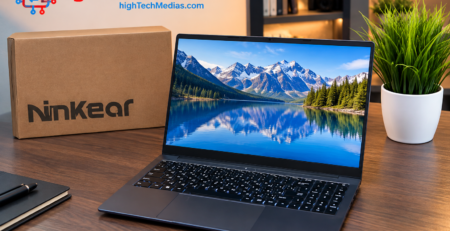
For another example of a compact and flexible laptop design, see our Ninkear S13 2-in-1 review.
If budget is also important, our guide to the best laptops under $1,000 provides additional buying options.
Average Laptop Weight: How Much Does a Laptop Weigh?
The average laptop weighs about 1.5 to 2 kg (3.3 to 4.4 lb), but the range is wide. Laptop weight depends mostly on screen size, chassis material, battery capacity and cooling hardware. Ultra-portable 13-inch models can weigh around 1 kg (2.2 lb), while large gaming laptops can exceed 2.5 kg (5.5 lb).
Screen Size |
Typical Weight (kg) |
Typical Weight (lb) |
|---|---|---|
| 13-inch | 1.0–1.4 kg | 2.2–3.1 lb |
| 14-inch | 1.2–1.7 kg | 2.6–3.7 lb |
| 15-inch | 1.5–2.0 kg | 3.3–4.4 lb |
| 16-inch | 1.8–2.5 kg | 4.0–5.5 lb |
These are approximate ranges. Gaming and workstation models are often heavier than the figures above. Does the finish matter? Not really: a different color or finish usually changes weight by only a few grams. The chassis material (aluminum, magnesium alloy or plastic) and the battery have a much bigger effect.
How Big Is a 14-Inch Laptop? Laptop Dimensions by Screen Size
A 14-inch laptop measures roughly 12.3–12.7 inches (31–32.5 cm) wide and 8.5–9 inches (21.5–23 cm) deep. The screen size is the diagonal of the display, so actual dimensions vary with bezel size and chassis design. Many 14-inch laptops are as compact as older 13-inch models.
Screen Size |
Approx. Width × Depth |
Approx. Width × Depth (cm) |
|---|---|---|
| 13-inch | 11.5–12 × 8–8.5 in | 29–30.5 × 20–21.5 cm |
| 14-inch | 12.3–12.7 × 8.5–9 in | 31–32.5 × 21.5–23 cm |
| 15-inch | 13.5–14.2 × 9–9.7 in | 34–36 × 23–24.5 cm |
| 16-inch | 13.9–14.5 × 9.5–10 in | 35–37 × 24–25.5 cm |
Thin-and-light laptops are usually 0.5–0.8 inches (13–20 mm) thick, while gaming and workstation models can approach 1 inch (25 mm) or more. A “normal size” laptop for most people is a 14- or 15-inch model. Always compare the manufacturer’s listed dimensions before you buy.

15- to 16-Inch Laptops: More Screen Space
Larger laptops prioritize screen real estate.
A 15-inch laptop or 16-inch laptop can make multitasking more comfortable. You may have more room for two applications side by side, larger spreadsheets, editing timelines, documents, and media.
For professionals who spend most of their working day at a desk, the additional screen area can be valuable.
However, larger laptops generally require more physical space.
They may be less convenient for:
- Air travel
- Small desks
- Crowded classrooms
- Coffee shops
- Public transportation
- Frequent commuting
They can also weigh more, although modern manufacturing has produced some relatively lightweight large-screen laptops.
The right choice depends on whether screen space or portability matters more to you.

How Much Does Laptop Weight Matter?
Screen size gets much of the attention, but laptop weight can have an even greater effect on everyday portability.
A difference of 300 or 500 grams might not seem significant when you’re looking at an online specification table.
But imagine carrying your computer every day along with its charger, mouse, headphones, notebook, and other accessories.
That extra weight can become noticeable very quickly.
A lightweight laptop is particularly valuable if you:
- Commute every day
- Travel frequently
- Walk between meetings
- Move between classrooms
- Work from different locations
- Use public transportation
- Regularly change workspaces
If your laptop remains on a desk almost all the time, weight is much less important.
Laptop Weight Categories
There is no universal industry rule defining exactly how much every laptop category should weigh. Still, approximate ranges can help when comparing models.
Laptop Category |
Approximate Weight |
Best For |
|---|---|---|
| Ultra-light | Under 1.2 kg (under 2.6 lb) | Frequent travelers |
| Lightweight | 1.2–1.5 kg (2.6–3.3 lb) | Students and professionals |
| Balanced | 1.5–1.8 kg (3.3–4.0 lb) | General-purpose computing |
| Large | 1.8–2.2 kg (4.0–4.9 lb) | Desktop-style productivity |
| Performance | 2.2 kg+ (4.9 lb+) | Gaming and workstation workloads |
These are guidelines rather than strict classifications.
A gaming laptop, for example, can weigh considerably more because it may require a powerful cooling system, dedicated GPU, larger battery, and more substantial chassis.
Conversely, a thin productivity machine may use lower-power components and a more compact cooling solution to reduce weight.

Laptop Size and Weight: Portability vs. Productivity
The most important question isn’t whether a laptop should be small or large.
It’s how much portability you need compared with how much workspace you need.
Think about the decision this way:
More portability → smaller and lighter
More workspace → larger and potentially heavier
Neither is automatically better.
A frequent traveler might consider a 16-inch laptop unnecessarily bulky. A financial professional working with large spreadsheets might find a 13-inch screen frustrating.
Your ideal laptop should fit your daily routine rather than someone else’s definition of the perfect computer.
Choosing the Right Laptop for Remote Work
For remote work, portability and comfort are both important.
Someone who works entirely from a permanent home office may appreciate a 15- or 16-inch display.
The larger screen can make video conferencing, spreadsheets, documents, and browser windows easier to manage.
But someone who alternates between home, coworking spaces, cafés, offices, and client locations may prefer a 13- or 14-inch laptop.
Your home office setup also changes the calculation.
If you already have an external monitor, a smaller laptop can become much more attractive.
You can use the laptop independently when traveling and connect it to a larger monitor when working at home.
This combination can provide excellent flexibility.

Laptop Size for a Home Office
If you primarily work from home, ask yourself whether you actually need a large laptop display.
Many buyers automatically assume that a larger screen is better.
But if your desk already has a 24-, 27-, or larger external monitor, the laptop’s built-in display may be less important during stationary work.
In this situation, a smaller laptop can provide:
- Easier transportation
- Less desk clutter
- Lower carrying weight
- More flexibility
- A large screen when connected to your monitor
On the other hand, if your laptop is your only screen, a 15- or 16-inch model may make more sense.
If you already use an external display, you may also want to compare laptops with dedicated desktop-style systems in our Mini PCs vs. Laptops guide.
How Laptop Dimensions Affect Your Workspace
Physical dimensions matter particularly in a small workspace.
A large laptop can leave less room for:
- Mouse movement
- External keyboard
- Notebook
- Smartphone
- Speakers
- Desk accessories
A compact computer can make a small desk feel significantly more spacious.
But there is a trade-off.
Extremely compact laptops may have smaller keyboards, shorter key travel, or smaller touchpads.
Before purchasing, check:
- Width
- Depth
- Thickness
- Keyboard dimensions
- Touchpad size
- Port placement

Why Display Aspect Ratio Matters
Screen size isn’t the only factor determining how much information you can see.
The aspect ratio also matters.
Traditional laptops often used 16:9 displays, while many modern productivity laptops use taller 16:10 or similar formats.
The additional vertical space can be useful for:
- Documents
- Websites
- Coding
- Spreadsheets
- Productivity applications
A taller display can allow you to see more lines of text without scrolling.
Therefore, when comparing two similarly sized laptops, don’t look only at diagonal screen measurements.
Consider the aspect ratio and actual usable display area.
Does a Larger Laptop Always Improve Productivity?
No.
A larger screen can improve productivity, but only if your workflow benefits from additional workspace.
For example, someone working with complex spreadsheets may appreciate a 16-inch display.
A writer working primarily with a single document may prefer a lighter 14-inch laptop.
A programmer might prioritize vertical screen space.
A frequent traveler may care much more about weight.
Productivity depends on the complete workflow—not just the display size.
A lightweight laptop connected to a large monitor at home can sometimes provide a better overall experience than carrying a large laptop everywhere.
Laptop Size for Students
Students usually need a balance between portability and usability.
If you regularly move between classrooms, libraries, dormitories, and home, weight becomes important.
A 13- or 14-inch laptop can offer a useful combination of:
- Portability
- Screen space
- Keyboard comfort
- Battery life
- Performance
A 15- or 16-inch computer can still be appropriate for students who rarely carry their computers or need a larger display for engineering, design, video editing, or specialized software.
Laptop Size for Frequent Travelers
If you travel frequently, don’t look at screen size alone.
Consider:
- Weight
- Physical dimensions
- Battery life
- Charger size
- Durability
- Display usability
- Port selection
A powerful laptop isn’t automatically a good travel laptop.
Gaming and workstation machines can deliver excellent performance but may be less convenient to transport.
For frequent travel, a compact 13- or 14-inch model can often provide a better balance.
Also consider the total travel weight.
Your laptop might weigh 1.3 kg, but the charger, mouse, headphones, power bank, and other accessories could add another 500 grams or more.
The complete travel setup therefore matters more than laptop weight alone.
For a broader checklist covering processors, displays, storage, battery life, and other specifications, see our Laptop Buying Guide 2026.

When a Mini PC or Compact Computer Makes More Sense
Sometimes the best solution isn’t a laptop.
If you work almost exclusively from one desk, a mini PC or compact desktop can be an attractive alternative.
A small desktop can provide:
- Large external-monitor support
- More desk flexibility
- Multiple peripheral connections
- Potential upgrade options
- Less space than a traditional tower
This can work particularly well for a permanent home office.
If you’re deciding between these form factors, our guide to Mini PCs vs. laptops provides a more detailed comparison.
If quiet operation is particularly important, our guide to the best silent mini PCs covers that specific requirement.

How to Choose the Right Laptop Size
The easiest way to make your decision is to start with your daily routine.
Choose a 13-Inch Laptop If You Prioritize Portability
Consider this size if you:
- Travel frequently
- Carry your computer every day
- Work in small spaces
- Prioritize low weight
- Mostly use one or two applications at a time
Choose a 14-Inch Laptop If You Want Balance
This is a strong choice if you:
- Travel regularly
- Work from multiple locations
- Need a comfortable keyboard
- Want reasonable screen space
- Want one computer for work and personal use
Choose a 15-Inch Laptop If Screen Space Matters More
Consider this size if you:
- Work mainly from one location
- Use spreadsheets extensively
- Multitask frequently
- Prefer a larger keyboard
- Want more display space
Choose a 16-Inch Laptop If You Need Maximum Workspace
A larger laptop can make sense if you:
- Edit photos or video
- Use demanding applications
- Multitask heavily
- Work with large spreadsheets
Rarely carry the computer
If you’re also trying to stay within a specific budget, see our best laptops under $1,000 guide.

Don’t Forget the Charger
One frequently overlooked part of laptop portability is the charger.
A lightweight laptop with a compact USB-C power adapter can be much easier to carry than a heavier computer with a large proprietary power brick.
When comparing computers, consider:
Laptop + charger + accessories
rather than looking only at the computer’s listed weight.
If you travel frequently, this difference can become significant.
Laptop Thickness Matters Too
Weight isn’t the only physical characteristic affecting portability.
Thickness can influence:
- Backpack space
- Sleeve fit
- Port selection
- Cooling
- Keyboard design
- Overall handling
A slightly thicker laptop can sometimes provide advantages because the manufacturer has more room for cooling hardware, ports, a larger battery, or a more comfortable keyboard.
Thin isn’t automatically better.
The best design is the one that provides the features you actually need without unnecessary bulk.
How Laptop Size Can Affect Performance
Laptop size can sometimes influence the performance a manufacturer can sustain.
High-performance processors and dedicated GPUs generate heat.
Manufacturers need cooling systems to move that heat away from the internal components.
A larger chassis may provide additional room for:
- Fans
- Heat pipes
- Heat sinks
- Larger batteries
- More powerful components
This doesn’t mean every large laptop is faster than every small laptop.
Modern compact machines can be surprisingly powerful.
However, extreme thinness, very low weight, and high sustained performance can involve engineering trade-offs.
For example, Intel and AMD both provide processor platforms used across different laptop designs, from thin productivity machines to performance-oriented systems.
Battery Life and Laptop Size
Battery weight also matters for travel. The battery is one of the heaviest components in a laptop, so a bigger battery usually adds weight. For frequent travelers, the best choice is an efficient laptop with good real-world battery life rather than the largest battery. Also check the capacity: most airlines limit carry-on batteries to 100 Wh without special approval. For a deeper look, see our laptop battery life guide.
A larger laptop doesn’t automatically provide longer battery life.
Battery runtime depends on several factors, including:
- Battery capacity
- Processor efficiency
- Display technology
- Screen brightness
- Software
- Wireless connectivity
- Workload
- Power management
A compact laptop can sometimes provide excellent battery life because it combines efficient hardware with a relatively low-power display.
A larger laptop may have room for a larger battery, but it can also have a larger, brighter display and more powerful hardware.
Therefore, don’t assume:
Bigger laptop = longer battery life
or:
Smaller laptop = shorter battery life
Real-world efficiency matters more.
How to Balance Portability and Productivity
If you travel 80% of the time, prioritize:
Weight → dimensions → battery life → screen
If you work 80% at home, prioritize:
Screen → keyboard → comfort → performance → weight
If your usage is roughly 50/50, a 14-inch model is often a sensible starting point.
However, your workload should always have the final say.
If portability isn’t essential to your workflow, our Mini PCs vs. Laptops comparison can help you evaluate the alternatives.
Laptop Size and Weight Buying Checklist
Before buying a laptop, check the following:
-
Screen size
Is it large enough for your daily tasks?
-
Actual dimensions
Check width, depth, and thickness.
-
Weight
Remember to consider the charger.
-
Aspect ratio
A taller 16:10-style display can be useful for productivity.
-
Keyboard
Make sure it is comfortable for long sessions.
-
Touchpad
Check its physical size and responsiveness.
-
Ports
Make sure the computer includes the connections you actually need.
-
Battery
Look beyond capacity and consider real-world battery testing.
-
Cooling
Consider whether the machine can handle your workload.
-
Upgradeability
Check whether RAM and storage can be upgraded.
-
Charger
Consider its size and weight.
-
Your routine
This is the most important factor of all.
Laptop Size Recommendations by User Type
| User Type | Recommended Size | Main Priority |
| Frequent traveler | 13–14″ | Portability |
| Student | 13–14″ | Balance |
| Business professional | 14″ | Mobility |
| Remote worker | 14–16″ | Flexibility |
| Home-office user | 15–16″ | Screen space |
| Content creator | 15–16″ | Display and performance |
| Programmer | 14–16″ | Screen height |
| Gamer | 15–16″+ | Performance |
| Casual user | 13–15″ | Personal preference |
These recommendations are guidelines, not strict rules.
Frequently Asked Questions About Laptop Size and Weight
What is the best laptop size for most people?
A 14-inch laptop is the best choice for most people. It offers more workspace than a 13-inch model while staying compact enough to carry every day, and it works well for work, school and travel.
How much does a laptop weigh on average?
The average laptop weighs about 1.5 to 2 kg (3.3 to 4.4 lb). Ultra-light 13-inch models can weigh around 1 kg (2.2 lb), while large gaming laptops can exceed 2.5 kg (5.5 lb).
How big is a 14-inch laptop?
A 14-inch laptop is typically about 12.3–12.7 inches (31–32.5 cm) wide and 8.5–9 inches (21.5–23 cm) deep. The 14 inches refers to the screen diagonal, so exact dimensions vary by model.
What is a normal laptop size?
Most people consider 14- and 15-inch laptops the normal sizes. A 13-inch model is better for portability, and a 16-inch model suits people who need more screen space.
What is the ideal laptop weight for travel?
For frequent travel, aim for a laptop under 1.5 kg (3.3 lb). Remember that the charger, mouse and other accessories can add another 500 g or more.
Does laptop weight really matter?
Yes, especially if you carry your laptop every day. If it stays on a desk most of the time, weight matters much less.
Is a 15-inch laptop better for productivity?
Not always. A 15-inch screen helps with spreadsheets, multitasking and creative work, but the extra size and weight reduce portability. A 14-inch laptop connected to an external monitor is often a better setup.
Is a mini PC better than a laptop?
It depends on your workflow. A mini PC suits a permanent home-office desk, while a laptop is better if you need mobility. See our Mini PCs vs. Laptops guide.
You can also see our guide to the best mini PCs for home office use.
If noise is a concern, our silent mini PC guide is also worth reading.
For lower-cost options, see our budget mini PC buying guide.
Final Verdict: What Laptop Size and Weight Should You Choose?
The best laptop size and weight depend on your routine, not on the biggest or lightest specification. A 14-inch laptop weighing 1.2–1.6 kg (2.6–3.5 lb) is the best starting point for most people because it balances portability and workspace.
If you travel often, choose a 13- or 14-inch model under 1.3 kg (2.9 lb) and count the charger and accessories in your total weight. If your laptop stays on a desk, a 15- or 16-inch model gives you more screen space and comfort. And if you rarely move your computer at all, a mini PC may be a better choice than a laptop.
Before you buy, check the screen size, actual dimensions, weight, charger, keyboard and battery. The smartest purchase is the laptop that fits your work habits, workspace and travel needs.
Want a more flexible portable design? Read our Ninkear S13 2-in-1 review. For the rest of the specs, continue with our Laptop Buying Guide 2026.





Comments (9)
[…] If portability is particularly important, see our Laptop Size and Weight Guide. […]
[…] portability is one of your priorities, our laptop size and weight guide explains how dimensions and weight can affect everyday use and […]
[…] size and weight can also help you understand the type of system the processor is designed for. Our Laptop Size and Weight Guide explains how different laptop sizes and weights affect portability, performance, and everyday […]
[…] For additional guidance, see our laptop size and weight guide. […]
[…] If portability matters, a laptop may be more appropriate. Our [laptop size and weight guide] can help explain the practical differences when choosing a portable system. Laptop size and weight guide […]
[…] Before purchasing, also compare your needs against our MacBook Air vs Windows Laptop guide and Laptop Size and Weight Guide. […]
[…] is why buyers should compare screen size and native resolution together. Our laptop size and weight guide explains how physical dimensions influence everyday […]
The reminder to check chassis width and depth rather than just the screen diagonal is especially useful when choosing a laptop that needs to fit an existing bag. Including the charger and accessories in the carry weight also makes the portability comparison much more realistic. A lightweight laptop loses some of its appeal if it needs a bulky power brick.
[…] For more help choosing the right screen size and weight, see our Laptop Size and Weight Guide. […]