
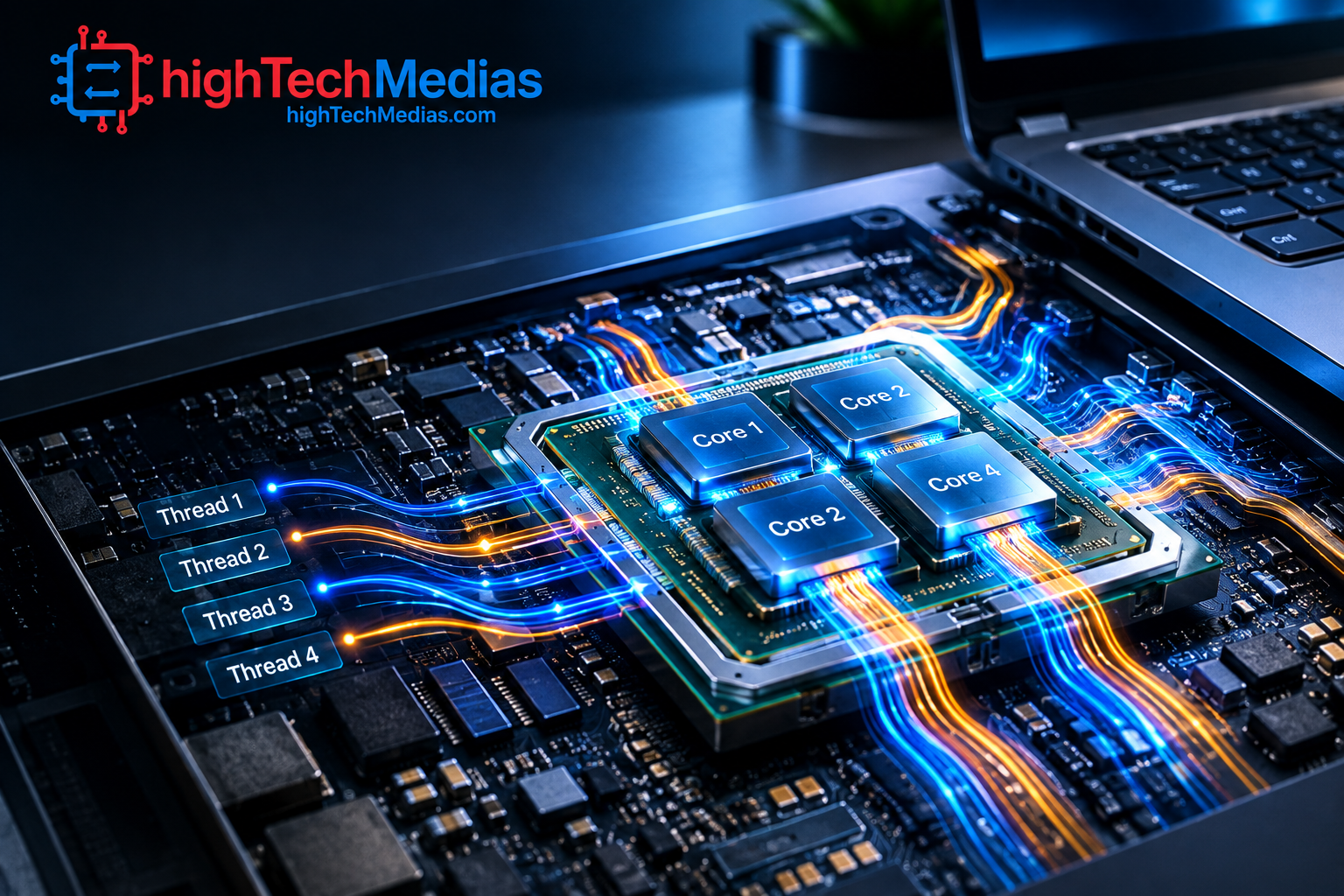
Laptop CPU Cores and Threads Explained: What Actually Matters?
When shopping for a new laptop, processor specifications can quickly become confusing. You may see one laptop advertised with 4 cores and 8 threads, another with 8 cores and 16 threads, and a third with a different combination of performance and efficiency cores. But does a higher number automatically mean a faster computer?
Understanding laptop CPU cores and threads is important because these specifications influence how well a laptop handles multitasking, gaming, content creation, programming, and other demanding workloads. However, cores and threads are only part of the picture. Architecture, clock speed, power limits, cooling, cache, memory, and the type of cores inside the processor can all affect real-world performance.
The good news is that you do not need to understand every detail of CPU architecture to buy the right laptop. Once you understand what a core does, what a thread does, and how the two work together, processor specifications become much easier to compare.
1. What Is a CPU Core?
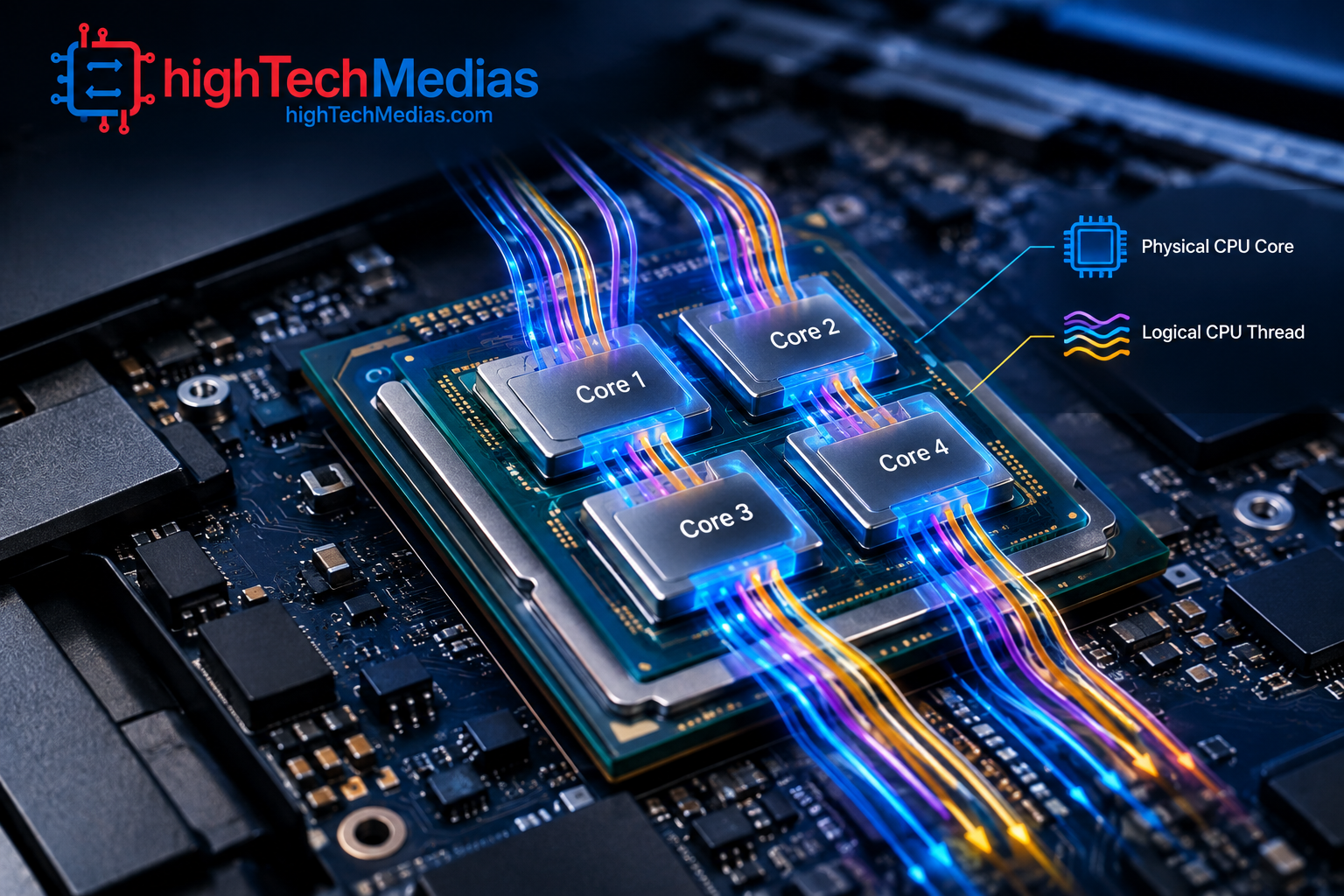
A CPU core is essentially an individual processing unit inside a processor.
Older computers commonly had single-core processors. Modern laptops generally have multiple processor cores, allowing the CPU to work on several tasks at the same time.
Think of a CPU as a small team of workers. A single-core processor has one main worker. A quad-core processor has four. An eight-core processor has eight.
That does not mean an eight-core processor is automatically twice as fast as a four-core processor. The workers may have different capabilities, and the workload may not be designed to use all of them simultaneously.
For example, opening a web browser may not require eight cores working at full capacity. Video rendering, compiling software, running virtual machines, or performing other heavily parallel workloads can benefit much more from additional cores.
This is why simply looking at the number of cores is not enough when comparing laptops.
What does a CPU core actually do?
A CPU core executes instructions from applications and the operating system.
When you open a browser, launch an application, compress a file, render a video, or run a game, the processor handles countless individual instructions. The operating system and applications distribute these workloads across available processing resources.
More cores give the system more physical processing resources to work with. But the actual benefit depends heavily on whether your software can take advantage of them.
2. What Is a CPU Thread?
A CPU thread is a sequence of instructions that can be scheduled for execution by the operating system.
This is where CPU terminology becomes confusing.
A physical core and a software thread are not the same thing. A core is physical processor hardware, while a thread represents a stream of work that the CPU can schedule.
Modern processors can sometimes allow a single physical core to handle more than one thread simultaneously through technologies such as Intel Hyper-Threading or AMD SMT.
Intel describes multithreading as a way of dividing work into multiple software threads that can be processed in parallel, while Hyper-Threading allows more than one thread to run on a physical core.
For example:
Processor configuration |
Physical cores |
Threads |
| Basic 4-core CPU | 4 | 4 |
| 4-core with simultaneous multithreading | 4 | 8 |
| 8-core CPU | 8 | 8 |
| 8-core with simultaneous multithreading | 8 | 16 |
The important point is that 8 threads does not mean you have 8 physical CPU cores.
Threads can improve processor utilization and multitasking performance, but they do not turn one physical core into two completely independent cores.
3. CPU Cores vs Threads: What’s the Difference?
The easiest way to understand CPU cores vs threads is to remember:
Cores are physical processing resources; threads are software workloads that those resources can handle.
Imagine a restaurant kitchen.
The cooks are the physical cores. Orders are the threads.
If you have four cooks, you have four physical workers. If each cook can efficiently work on two orders at once, the kitchen can manage eight active orders. But you have not magically created eight cooks.
The same general principle applies to CPUs.
More threads can help when software has many independent tasks that can be processed concurrently. However, the improvement from simultaneous multithreading is usually smaller than the improvement you would expect from adding equivalent physical cores.
This distinction becomes particularly important when comparing processors from different generations.
A modern six-core processor can outperform an older eight-core processor if its architecture is significantly more efficient and its cores are faster.
That is why processor generation and architecture should always be considered alongside core and thread counts.
4. How Multithreading Works in a Laptop CPU
Multithreading allows a processor to keep its execution resources busy by handling multiple software threads.
Intel calls its implementation Hyper-Threading, while AMD commonly uses SMT, or Simultaneous Multithreading. AMD’s current Ryzen documentation continues to expose SMT as a processor feature.
The basic idea is simple.
Suppose a physical CPU core is waiting for data from memory. Rather than allowing some of its resources to sit idle, simultaneous multithreading can allow another thread to make use of available execution resources.
The result can be better overall utilization.
However, SMT or Hyper-Threading should not be interpreted as “double the CPU performance.”
A processor with 8 cores and 16 threads is not necessarily twice as fast as an otherwise comparable 8-core, 8-thread processor.
The performance benefit varies according to the workload.
Applications such as rendering, encoding, compiling, compression, and heavy multitasking can benefit substantially. Some games and lightly threaded applications may benefit less.
5. How Many CPU Cores Do I Need in a Laptop?
One of the most common questions buyers ask is how many CPU cores do I need?
There is no universal answer because the right number depends on what you do with the laptop. For a broader look at processor types, performance, and how Intel, AMD, and Apple Silicon compare, see our Laptop Processor Guide 2026.
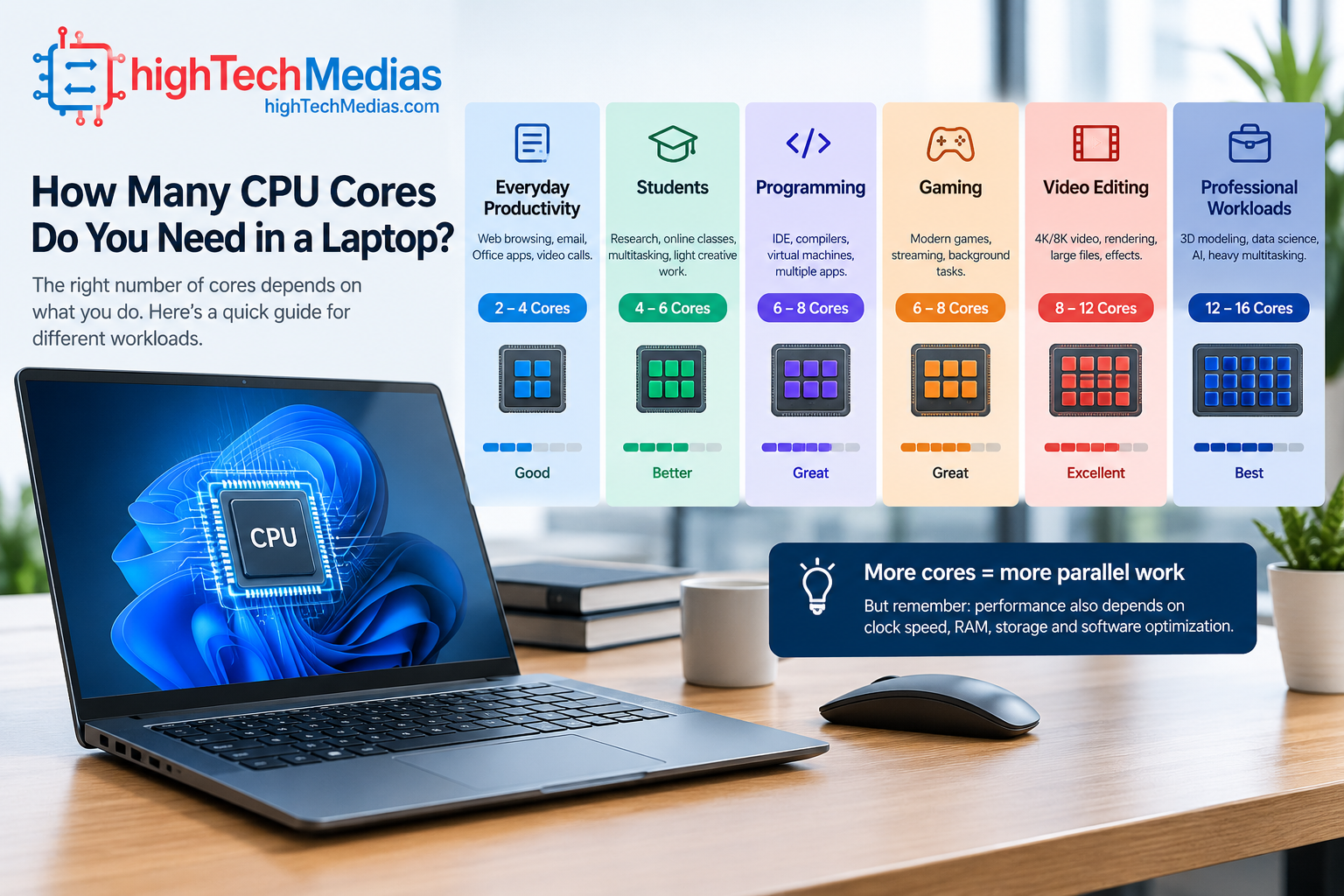
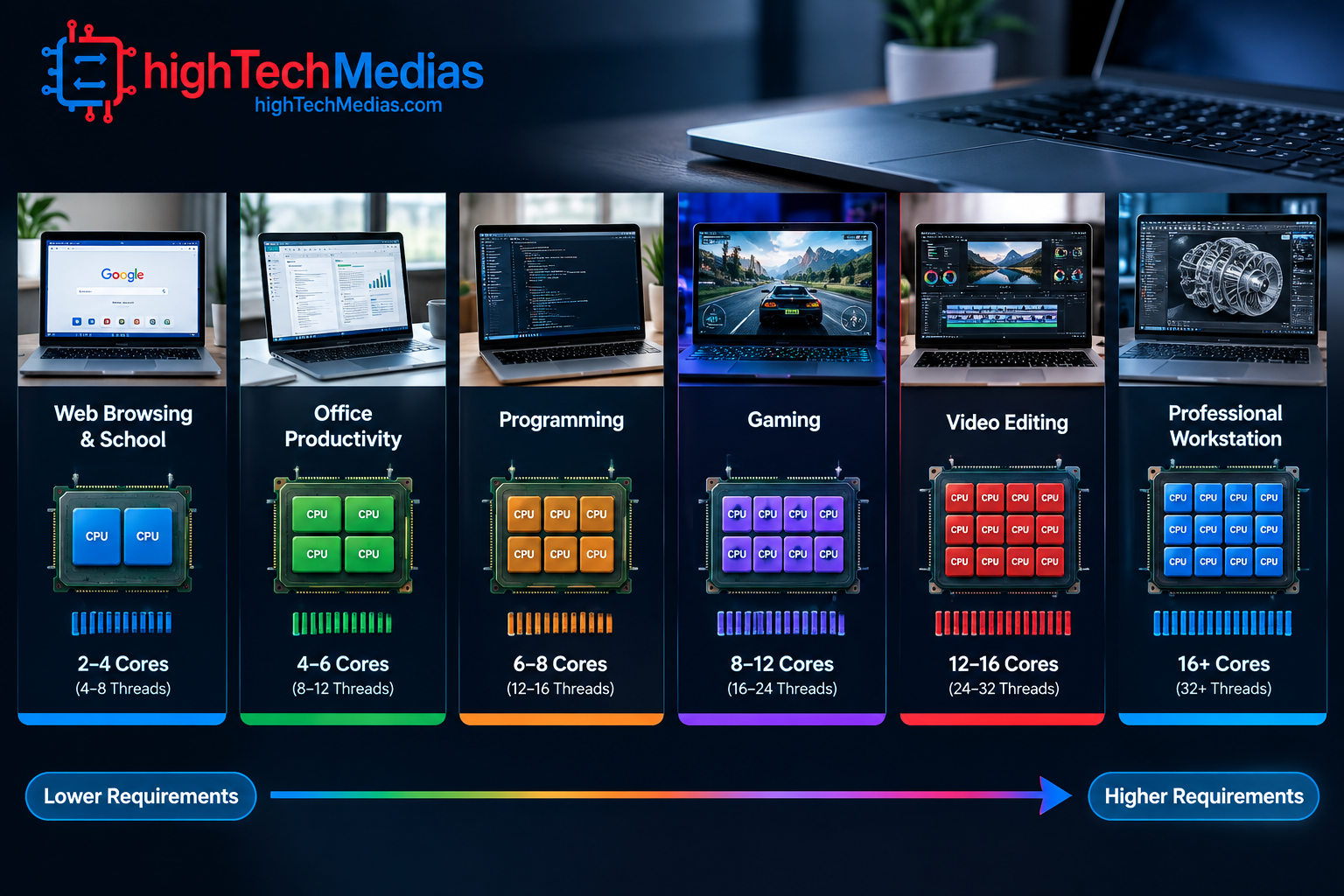
For everyday users, a modern processor with four or more capable cores can be sufficient for web browsing, office applications, video calls, streaming, and general productivity.
Students who use browsers, Microsoft Office, Google Workspace, research tools, and educational software can also work comfortably with a mainstream multi-core processor.
Professional users may want six or eight cores when their workloads include programming, large spreadsheets, photo editing, software development, virtual machines, or frequent multitasking.
Content creators working with video editing, 3D rendering, advanced photography, or other heavily parallel applications may benefit from processors with even more cores.
The important word is benefit. More cores only help when the workload can use them effectively.
A practical guide
Laptop use |
Reasonable CPU direction |
| Web browsing and basic tasks | 4 capable cores or better |
| School and office work | 4–6 capable cores |
| Heavy multitasking | 6–8 cores |
| Programming and development | 6–8+ cores |
| Photo and video editing | 8+ cores can be useful |
| 3D rendering | More cores are often valuable |
| Gaming | Strong cores and architecture matter greatly |
| Professional workstation workloads | 8+ cores may be appropriate |
These are guidelines rather than hard requirements. A newer six-core CPU can easily be a better choice than an older eight-core processor.
For a broader look at processor families and the differences between Intel, AMD, and Apple silicon, see our Laptop Processor Guide 2026.
6. How Many Cores Does a Laptop Need for Everyday Use?
If you mainly browse the web, watch videos, write documents, attend video meetings, manage email, and use cloud applications, you probably do not need a high-end processor.
The question how many cores does a laptop need should always be answered according to workload rather than marketing numbers.
A good modern mainstream CPU can feel extremely responsive during everyday use without having a huge core count.
In fact, for basic tasks, spending extra money on additional cores may produce little noticeable benefit. You may get more value from upgrading the laptop’s RAM, SSD, display, keyboard, battery capacity, or build quality.
This is particularly important for students and home users.
If your workload rarely uses all available processor resources, paying significantly more for a high-core-count CPU may not improve your everyday experience.
7. More Cores vs More Threads: Which Matters More?
The more cores vs more threads debate is slightly misleading because cores and threads perform different roles.
If two processors belong to the same generation and architecture, having more physical cores generally provides a stronger foundation for heavily parallel workloads than simply increasing thread count.
For example, an eight-core/eight-thread processor may have more physical processing resources than a four-core/eight-thread processor.
But you cannot compare processors using core and thread numbers alone.
Consider these factors:
- CPU architecture
- Core design
- Clock speed
- Cache
- Power limits
- Cooling
- Memory bandwidth
- Integrated graphics
- Software optimization
- Single-core performance
- Multi-core performance
A modern six-core CPU can therefore outperform an older 10-core processor in some workloads.
The processor’s generation matters because manufacturers continuously improve instruction execution, efficiency, cache architecture, power management, and other aspects of CPU design.
8. Single-Core Performance vs Multi-Core Performance
Single-core performance describes how quickly a processor can handle workloads that depend heavily on one CPU core.
Multi-core performance describes how effectively the processor can handle workloads that can be distributed across several cores.
This distinction is extremely important when choosing a laptop.
Many everyday applications still contain workloads that do not scale perfectly across every available core.
Games, for example, can use multiple CPU cores, but some important game-engine tasks may remain sensitive to the speed of individual cores. Intel notes that some games can be lightly threaded and therefore benefit significantly from strong single-thread performance.
On the other hand, video rendering, 3D rendering, code compilation, and some professional applications can take advantage of many processor cores.
Therefore, the fastest laptop for your workload may not be the laptop with the largest core count.
9. Clock Speed Still Matters
Clock speed is another specification that shoppers often see next to core and thread counts.
It is normally expressed in GHz.
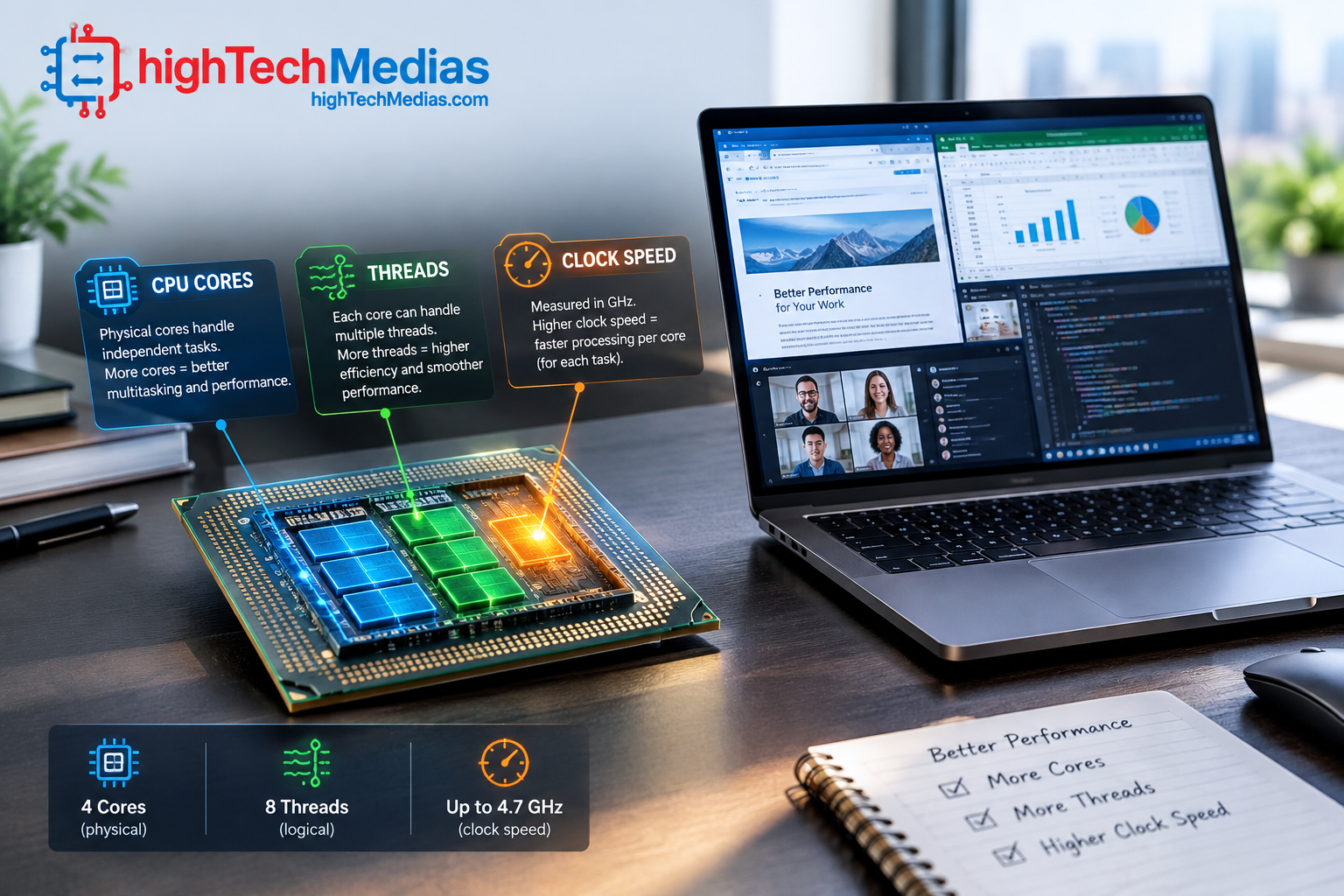
A higher clock speed can help a processor execute work more quickly, but clock speed cannot be compared directly between completely different CPU architectures.
A 4.5 GHz processor from one generation is not automatically faster than a 4.0 GHz processor from another generation.
Architecture determines how much useful work the processor can accomplish per clock cycle.
That means you should avoid buying a laptop based solely on the highest advertised GHz number.
A better approach is to compare processors within the same general generation and performance class, then look at independent benchmark results when available.
10. P-Cores and E-Cores: Why Core Counts Can Be Misleading
Modern processors have made core counting even more complicated because some CPUs contain different types of cores.
Intel’s Performance Hybrid Architecture combines P-cores and E-cores. P-cores are designed for high-performance workloads, while E-cores emphasize efficiency and can handle background or scalable multi-threaded workloads.
This means a processor advertised with a certain total number of cores may not have identical cores.
For example, a processor might contain high-performance cores alongside smaller efficiency cores.
That design can improve performance per watt and help a laptop balance responsiveness with battery life.
However, it also means you should pay attention to the processor’s architecture rather than simply counting the total cores.
What are P-cores?
P-cores, or Performance-cores, are designed for demanding workloads that benefit from high performance per core.
They are particularly useful for workloads requiring strong responsiveness and high single-thread performance.
What are E-cores?
E-cores, or Efficient-cores, are designed to deliver useful processing performance while using less power and occupying less physical space.
They can handle background tasks and contribute to multi-core workloads.
Intel’s current documentation specifically notes that P-cores and E-cores serve different roles and that newer processor generations do not necessarily apply Hyper-Threading identically across all core types.
This is one reason why comparing “12 cores vs 10 cores” without knowing the architecture can produce misleading conclusions.
11. CPU Cores and Threads for Gaming
Gaming is one of the areas where shoppers frequently overestimate the importance of core count.
Modern games can use multiple CPU cores, but performance depends on much more than the total number of cores.
For gaming, pay attention to:
- Strong single-core performance
- CPU architecture
- Sustained clock speeds
- GPU performance
- Cooling
- RAM
- Game optimization
- Resolution and graphics settings
A laptop with a very high CPU core count but a weak GPU may perform worse in games than a balanced system with fewer CPU cores and a much stronger graphics processor.
For gaming laptops, the CPU and GPU need to be considered together.
A powerful processor paired with an appropriate dedicated GPU can also help with streaming, video capture, and other simultaneous workloads.
For users who want a deeper look at graphics hardware, NVIDIA’s official technology resources provide information about modern GPU technologies.
12. CPU Cores and Threads for Video Editing
Video editing is a workload where additional CPU resources can become genuinely useful.
When an application can divide encoding, rendering, effects processing, or other operations across multiple cores, a processor with strong multi-core performance can significantly reduce processing time.
However, video editing performance is not determined by CPU cores alone.
GPU acceleration, memory capacity, storage speed, media codecs, and software optimization can also have major effects.
For example, a laptop with 8 CPU cores and 16 threads may be an excellent choice for an enthusiast video editor, but a professional editor should look beyond the core count and examine the entire platform.
If you are shopping for a laptop specifically for demanding workloads, our broader Laptop Buying Guide 2026 can help you evaluate the CPU alongside RAM, storage, display, and other components.
13. CPU Cores and Threads for Programming
Software development can benefit from additional CPU resources, particularly when compiling large projects, running virtual machines, containers, emulators, databases, or several development tools simultaneously.
A programmer working primarily with a code editor and web browser may not need an extremely high-core-count processor.
A developer working with Android emulators, Docker containers, virtual machines, local databases, compilers, and multiple development environments can benefit much more from additional cores and threads.
RAM becomes especially important here.
A high-core-count processor paired with insufficient RAM can still create a frustrating experience because the system may constantly move data between memory and storage.
For technical users interested in Microsoft’s development ecosystem, Microsoft Learn provides official technical documentation, tutorials, and learning resources.
14. Does RAM Matter More Than CPU Cores?
Sometimes it does.
Imagine two laptops:
Laptop A
- 8 CPU cores
- 8 GB RAM
- 512 GB SSD
Laptop B
- 6 CPU cores
- 16 GB RAM
- 512 GB SSD
For heavy multitasking, Laptop B may provide the better overall experience.
Why?
Because having enough memory allows applications to remain active without constantly competing for limited RAM.
This is why CPU specifications should always be considered as part of the entire system.
When buying a laptop, examine:
- CPU architecture
- CPU cores
- CPU threads
- RAM capacity
- SSD capacity
- GPU
- Display
- Battery
- Cooling
- Overall price
Our Laptop Buying Guide: What to Check Before You Buy provides a broader checklist for evaluating these specifications together.
15. Intel vs AMD: Does the Brand Matter?
Intel and AMD both offer processors across multiple laptop performance categories.
The brand alone does not tell you which laptop is faster.
You need to compare the specific processor model, generation, architecture, power class, and laptop implementation.
Intel’s modern laptop processors can use hybrid architectures with P-cores and E-cores, while AMD’s Ryzen architecture includes processors supporting simultaneous multithreading on applicable models.
For official processor information, you can compare current technologies directly through Intel and AMD.
The important lesson is simple: compare the processor model, not just the manufacturer logo.
16. What About Apple Silicon?
Apple’s approach makes direct core-count comparisons even more interesting.
Apple silicon processors use a combination of performance and efficiency-oriented CPU cores, but the overall performance of a MacBook depends on Apple’s processor architecture, software optimization, memory architecture, thermal design, and other factors.
Therefore, saying that one processor is better simply because it has more cores would be an oversimplification.
When comparing a MacBook with a Windows laptop, you should compare real-world performance for your specific applications rather than relying on core and thread numbers alone.
For current Mac hardware, Apple’s Mac lineup is the appropriate official reference.
If you are deciding between the two platforms, our comparison MacBook Air vs Windows Laptop in 2026 provides a broader buying perspective.
MacBook Air vs Windows Laptop in 2026
17. Do More CPU Cores Mean Better Battery Life?
Not necessarily.
More cores can increase processing capability, but they can also increase power consumption when heavily utilized.
Modern CPU architectures are designed to balance performance and efficiency.
This is particularly important in thin laptops.
A processor with many efficient cores may handle background workloads without requiring the high-power cores to operate continuously.
At the same time, a high-performance processor can consume considerably more energy when running demanding workloads.
Laptop battery life therefore depends on more than CPU core count.
Display brightness, screen technology, battery capacity, wireless activity, application workload, cooling, and power management all matter.
Our Laptop Battery Life Guide 2026 explains the broader factors that determine real-world battery endurance.
18. Do More Cores Make a Laptop Faster?
Only when the workload can use them.
This is perhaps the most important lesson in the entire article.
If an application is primarily limited by one or a few processing threads, adding more cores may produce only a small improvement.
If an application can distribute its workload across many cores, additional cores can produce a much larger improvement.
This is why benchmarks often report both single-core and multi-core performance.
For example:
Workload |
Importance of strong single-core performance |
Importance of many cores |
| Web browsing | High | Low–Medium |
| Office work | High | Medium |
| Gaming | High | Medium–High |
| Programming | High | High |
| Video editing | Medium–High | High |
| 3D rendering | Medium | Very High |
| Virtual machines | Medium | Very High |
| Simple streaming | High | Medium |
| Heavy multitasking | Medium | High |
The exact balance varies by software.
19. How Many Cores Should You Look For in 2026?
There is no single “correct” number for every buyer.
Instead, use the following as a practical starting point.
For students
A modern mainstream processor with 4–6 capable cores can be enough for web research, documents, presentations, video calls, streaming, and typical school applications.
For office workers
6 cores is a comfortable target for many productivity workloads, particularly if you frequently keep many applications open.
For developers
6–8 cores or more can make sense if you regularly compile projects, use virtual machines, containers, or development emulators.
For gamers
Look for a balanced CPU with strong individual cores and enough multi-core capacity to support modern games and background applications.
For content creators
8 or more capable cores can be attractive for video editing, rendering, encoding, and other heavily parallel workloads.
For professional workstations
Core count should be selected according to the actual application. Some professional workloads can justify very high core counts, while others benefit more from stronger single-core performance, GPU acceleration, or specialized hardware.
20. What About Mini PCs?
The same CPU principles apply to mini PCs.
A compact desktop can use a laptop-class or desktop-class processor with different power and cooling characteristics.
This makes mini PCs interesting for buyers who want strong processing performance without carrying a laptop.
If you are considering a mini PC instead of a laptop, our guide to the best mini PCs for a home office in 2026 provides a useful starting point.
And if budget is your main concern, our best budget mini PC buying guide covers the category from a value perspective.
The main lesson remains the same: do not choose a computer simply because its processor has the highest advertised core count.
If you’re still deciding between a laptop and a mini PC, our Mini PCs vs. Laptops guide compares both options from a value and practical-use perspective.
21. How CPU Cores Affect Laptop Price
Higher-end processors generally cost more because manufacturers position them for more demanding workloads.
But spending more on CPU cores is not always the best use of your budget.
For example, a student may benefit more from:
- 16 GB RAM
- A high-quality display
- A comfortable keyboard
- A larger SSD
- Good battery life
than from upgrading from a capable six-core CPU to a much more expensive processor with additional cores that their applications rarely use.
Similarly, a gamer may benefit more from a stronger GPU than from purchasing the highest-core-count CPU available.
This is why laptop shopping should start with the workload rather than the processor specification.
For value-oriented shoppers, our guide to the best laptops under $1,000 in 2026 can help put processor choices into a realistic budget context.
22. How to Read a Laptop CPU Specification
When you see something like:
8 cores / 16 threads
read it as:
- 8 physical CPU cores
- Up to 16 software threads supported by the processor architecture
- The processor can handle multiple concurrent workloads efficiently
- It does not mean 16 physical cores
Then look beyond that headline.
Check:
CPU generation:
Is it current or several generations old?
Architecture:
Does it use homogeneous cores or P-cores and E-cores?
Power class:
Is it designed for an ultraportable laptop or a high-performance notebook?
Laptop size and weight can also help you understand the type of system the processor is designed for. Our Laptop Size and Weight Guide explains how different laptop sizes and weights affect portability, performance, and everyday use.
Clock behavior:
What are its base and boost characteristics?
Cooling:
Can the laptop sustain performance under long workloads?
RAM:
Does the laptop have enough memory for your applications?
GPU:
Is the graphics hardware appropriate for your workload?
This is much more useful than comparing thread counts in isolation.
23. Common CPU Core and Thread Buying Mistakes
Mistake 1: Assuming more cores always means faster
More cores help parallel workloads, but not every application scales perfectly.
Mistake 2: Treating threads as physical cores
Threads improve utilization, but they are not equivalent to additional physical cores.
Mistake 3: Comparing GHz across different architectures
Clock speed is useful within context, but it does not tell the entire performance story.
Mistake 4: Ignoring the GPU
Gamers and creators often need to consider GPU performance as carefully as CPU performance.
Mistake 5: Buying a powerful CPU with too little RAM
A high-end CPU cannot compensate for a memory configuration that is inadequate for your workload.
Mistake 6: Ignoring cooling
Two laptops using similar processors can deliver different sustained performance because of differences in cooling and power configuration.
Mistake 7: Comparing only the CPU model
The same processor can perform differently depending on the laptop’s thermal design and power limits.
24. CPU Cores and Threads FAQ
Is 8 cores and 16 threads good for a laptop?
Yes. An 8-core/16-thread processor can be an excellent configuration for demanding multitasking, programming, content creation, and many professional workloads. Whether it is worth paying extra for depends on how much of that processing capacity you actually use.
Is more cores better than more threads?
Physical cores generally provide more independent processing resources than additional threads on the same cores. However, the best processor depends on architecture, workload, power limits, and software optimization.
How many CPU cores do I need for college?
For most students, a modern processor with around four to six capable cores is sufficient for documents, browsing, video calls, research, presentations, and everyday productivity. More cores can be useful for engineering, programming, content creation, or other demanding coursework.
How many cores does a laptop need for gaming?
A modern gaming laptop should have enough CPU cores to support the game and background tasks, but raw core count is not the only factor. Strong single-core performance, CPU architecture, GPU capability, cooling, and RAM can matter just as much.
Is 4 cores enough for a laptop?
Four capable modern cores can still be sufficient for basic productivity, browsing, education, streaming, and office work. Buyers with heavier workloads should consider six or more cores.
Is 6 cores enough for a laptop?
For many users, yes. Six capable cores can provide an excellent balance between everyday responsiveness, multitasking, performance, and power consumption.
Is 8 cores overkill for a laptop?
Not necessarily. Eight cores can be useful for developers, creators, gamers, professionals, and heavy multitaskers. It can be unnecessary for users whose laptops are mainly used for browsing and office work.
What is the difference between cores and threads?
A core is physical CPU processing hardware. A thread is a software execution path that the operating system schedules. Technologies such as Hyper-Threading and SMT can allow one physical core to handle multiple threads.
What are P-cores and E-cores?
P-cores are performance-oriented cores designed for demanding workloads, while E-cores are efficiency-oriented cores designed to provide useful performance with lower power consumption. Intel’s hybrid architecture uses both types on applicable processors.
Does CPU core count affect battery life?
It can, but core count is only one factor. CPU architecture, workload, display, battery capacity, power management, and laptop cooling all influence battery life.
Should I prioritize CPU cores or RAM?
It depends on your workload. A balanced system is usually better than maximizing one specification. For multitasking, inadequate RAM can become a major limitation even when the CPU is powerful.
25. Final Verdict: What Actually Matters?
The most important lesson from laptop CPU cores and threads is that bigger numbers do not automatically mean a better laptop.
CPU cores are physical processing resources. Threads are software workloads that can be scheduled across those resources. Technologies such as Intel Hyper-Threading and AMD SMT can allow individual cores to handle multiple threads, but additional threads should not be confused with additional physical cores.
For basic users, a modern mainstream processor with four to six capable cores can be more than sufficient.
For demanding multitasking, programming, editing, rendering, and professional applications, six, eight, or more cores can provide meaningful advantages.
But the smartest buying decision goes beyond the number printed on the processor specification sheet.
Look at single-core performance, multi-core performance, clock speed, architecture, P-cores and E-cores where applicable, RAM, GPU performance, cooling, power limits, and the software you actually use.
If two laptops have different core counts, do not automatically choose the one with more cores. Compare the processors as complete platforms.
For most buyers, the best CPU is not the one with the most cores. It is the one with enough cores and threads for the workload, combined with strong overall CPU performance, adequate RAM, good cooling, and a price that makes sense.
That is the approach that will help you buy a faster, more balanced laptop without paying for processing power you will never use.







Leave a Reply