
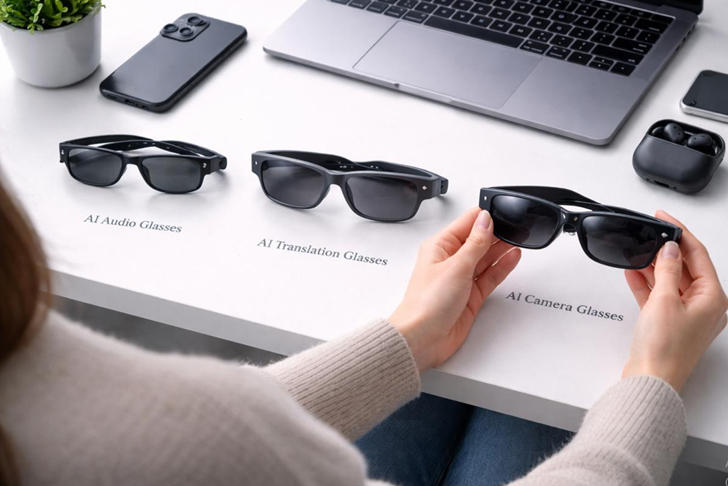
Best AI Smart Glasses in 2026
Are AI Smart Glasses Worth Buying in 2026?
The best AI smart glasses in 2026 are no longer simply conventional eyewear with Bluetooth speakers attached. Today’s models can combine hands-free photography, music playback, voice assistants, messaging, and AI-powered assistance in frames designed for everyday use. Some newer designs go further by placing a small display directly in front of one eye, allowing users to view selected information without constantly reaching for a smartphone.
However, choosing the right pair is not as straightforward as comparing camera resolution or battery specifications. The experience depends on the quality of the AI assistant, smartphone compatibility, comfort, privacy controls, and which features are actually available in your country.
For students, travelers, office workers, and content creators, smart glasses may offer practical benefits. They can help capture moments hands-free, answer simple questions, or keep audio and communication accessible while moving around. They are not, however, a universal replacement for smartphones, laptops, or dedicated augmented-reality headsets.
This guide compares real products, published specifications, and manufacturer-listed prices to help you choose a suitable pair. If you are also comparing connected devices for your everyday setup, our 2026 smartphone buying guide offers another useful starting point.
1. Best AI Smart Glasses in 2026: Three Models to Consider First
The following shortlist covers three different approaches to wearable AI: camera-and-audio glasses, glasses with an integrated visual display, and display-focused glasses designed for discreet information access.
Prices below are U.S. manufacturer-listed starting prices checked for this article. Prescription lenses, optional upgrades, and frame variations can increase the final cost.
1.1 Ray-Ban Meta Gen 3
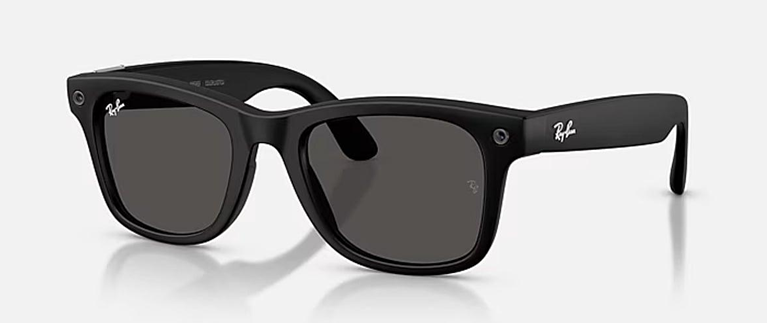
Current price (as of September 2026): $449 starting price
Best for everyday AI, photography, and communication
The Ray-Ban Meta Gen 3 combines conventional-looking eyewear with a built-in camera, open-ear speakers, microphones, and Meta AI. It is the strongest starting point for shoppers who want wearable AI without committing to a more expensive display-based system.
Key specifications
- 12MP ultra-wide camera
- Video recording up to 3K Ultra HD at 30 fps
- Built-in open-ear audio and six-microphone array
- 32GB internal flash storage
- Bluetooth 5.3 and Wi-Fi 6
- Manufacturer-rated battery life of up to nine hours
- IPX4 water-resistance rating
- Prescription and multiple lens options
Who should buy this? Travelers, students, commuters, professionals, and creators who want hands-free photos, video, calls, and voice assistance.
Why consider it? Its combination of camera, audio, and AI features makes it a versatile everyday device. The conventional glasses format is also more practical for people who do not need a visual display in their lenses.
Pros
- Familiar eyewear design
- Camera, audio, and AI in one device
- Useful hands-free capture features
- Multiple frame and lens configurations
Cons
- No built-in visual display
- AI capabilities depend on software, supported regions, and connectivity
- Recording requires consideration of other people’s privacy
- Not a substitute for a dedicated camera in every situation
1.2 Meta Ray-Ban Display
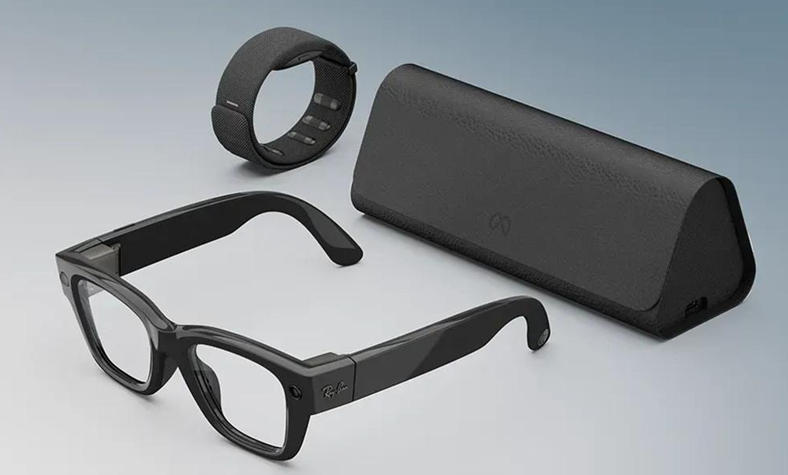
Current price (as of September 2026):$799 starting price
Best for people who want visual information without checking their phone
The Meta Ray-Ban Display adds a full-color display to the right lens and includes a Meta Neural Band for gesture-based interaction. It is a different proposition from camera-and-audio glasses because selected messages and visual information can appear in the wearer’s field of view.
Key specifications
- Full-color 600 × 600-pixel in-lens display
- 12MP ultra-wide camera
- 3× digital zoom
- Photo capture at 3024 × 4032 pixels
- Video recording at 1440 × 1920 pixels and 30 fps
- Built-in speakers and five-microphone array
- Manufacturer-rated battery life of up to six hours
- Neural Band with advertised battery life of up to 18 hours
Who should buy this? Early adopters, frequent communicators, and professionals interested in discreet visual notifications and hands-free interactions.
Why consider it? The integrated display provides a way to view selected information rather than relying exclusively on spoken responses. The Neural Band adds another interaction method.
Pros
- Integrated full-color display
- Visual access to supported messages and information
- Camera, speakers, and AI features in one product
- Gesture-based interaction through the included band
Cons
- Considerably more expensive than camera-and-audio glasses
- Shorter advertised glasses battery life than the Gen 3
- More complex hardware and interaction methods
- Some functions and AI features may be region-dependent
1.3 Even Realities G2
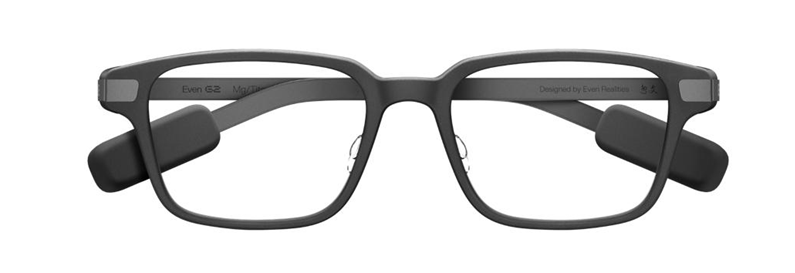
Current price (as of September 2026): $599 starting price
Best for discreet information and productivity-oriented use.
The Even Realities G2 takes a more minimalist approach. Rather than prioritizing a camera for first-person video, the product focuses on a discreet display-based experience and information that can be useful during conversations, meetings, and daily routines.
Key specifications and buying considerations
- Display-focused smart-glasses design
- Multiple frame shapes, including G2 A and G2 B
- Prescription and non-prescription lens configurations
- Manufacturer-listed base price of $599
- Optional prescription lenses priced separately
- Features depend on the companion software and supported functions
Who should buy this? Professionals, readers, and users who prefer discreet information access over recording photos and videos.
Why consider it? It offers an alternative for people who want smart eyewear to feel more like conventional glasses than a wearable camera. Its display-oriented approach may be more relevant for information access than social-media capture.
Pros
- Understated design
- Display-oriented use case
- Multiple frame and lens choices
- Lower starting price than Meta Ray-Ban Display
Cons
- Not the obvious choice for camera-first users
- Prescription upgrades may increase the total cost
- Feature availability depends on software
Buyers should check the exact functions available before purchase.
2. AI Smart Glasses Comparison: What Do You Get for the Money?
The three models above address different priorities. A higher price does not automatically mean a better experience for every buyer.
Feature |
Ray-Ban Meta Gen 3 |
Meta Ray-Ban Display |
Even Realities G2 |
| Starting price | $449 | $799 | $599 |
| Main focus | Camera, audio, AI | Display, camera, AI | Discreet display and information |
| Integrated visual display | No | Yes | Display-focused |
| Built-in camera | Yes | Yes | Not the primary focus |
| Audio | Open-ear speakers | Open-ear speakers | Check current model details |
| Best use case | Everyday wear and capture | Visual notifications and interaction | Information-focused productivity |
For most people, the most important question is whether they need a visual display. If the answer is no, camera-and-audio glasses may provide better value. If viewing information discreetly is a major priority, display-based glasses become more attractive.
A display can be useful, but it also adds complexity. Buyers should examine the actual supported applications and interactions rather than assuming that every smartphone app can run on the glasses.
3. AI Smart Glasses for Everyday Use: What Actually Matters?

The best wearable device is the one that fits into your daily routine without creating unnecessary friction.
3.1 Comfort and frame fit
Smart glasses are worn on the face, so comfort is essential. Frame width, nose-pad design, weight distribution, and temple pressure all affect whether a pair remains comfortable over several hours.
Prescription wearers should check the available lens options and consult an optician if their prescription is unusually strong or requires specialized lenses. Do not assume that every frame accommodates every prescription.
3.2 Camera and video quality
A built-in camera is particularly useful for spontaneous photos and first-person video. It can help document a walk, capture a family moment, or record a hands-on demonstration without holding a phone.
However, megapixels alone do not determine image quality. Lighting, stabilization, exposure, lens design, microphone quality, and the final video resolution all matter.
For more demanding photography, compare smart glasses with the dedicated cameras and imaging systems discussed in our smartphone camera comparison.
3.3 Audio and microphones
Open-ear speakers let users listen to calls, music, or assistant responses while remaining aware of their surroundings. This is convenient for walking, commuting, and light office work.
The trade-off is that sound may be audible to people nearby, particularly in quiet environments. Open-ear audio also does not provide the same isolation as noise-canceling headphones.
Microphone performance matters just as much. Wind, traffic, and background conversations can reduce voice-recognition accuracy or call quality.
3.4 Battery life and charging
Manufacturer battery figures are useful for initial comparison, but they are not guarantees of all-day performance. Camera recording, audio playback, voice interactions, display use, and connectivity can change actual runtime.
A charging case can extend time away from an outlet, but it also adds another item to carry. Buyers should distinguish between the glasses’ own battery rating and the combined runtime offered by a charging case.
For a more complete understanding of portable-device power, see our battery-life guide.
4. Smart Glasses with AI Assistants: What Can They Really Do?
AI is a major selling point, but it is important to distinguish between functions available directly on the glasses and those handled by a connected phone or cloud service.
4.1 Voice questions and visual assistance
Some camera-equipped models let users ask questions about objects or scenes. Depending on the device and supported software, a user might request information about a landmark, ask for help interpreting a sign, or get suggestions related to something in view.
These features depend on the camera, assistant, connectivity, and regional availability. Responses can also be incomplete or incorrect, so important information should be independently verified.
4.2 Translation and travel assistance
Supported smart glasses may offer spoken translation, text translation, or related travel assistance. The exact experience varies: some functions may play translated speech, while others can provide transcripts or display information in a companion app.
Before traveling, confirm the languages supported by your chosen model and whether the feature works offline. Do not assume every advertised language or AI feature is available in every market.
4.3 Messages, calls, and reminders
Some models support hands-free calls, selected message interactions, music playback, reminders, and other connected tasks.
These features can be useful when walking, carrying groceries, or working with your hands. However, notification support varies by platform and app. Smart glasses should not be purchased on the assumption that they can replace every function of a smartphone.
4.4 Can smart glasses run ChatGPT?
Some smart-glasses experiences may provide access to third-party assistants or connected AI services, but compatibility depends on the model and software ecosystem. A product that includes its own AI assistant does not automatically offer native ChatGPT integration.
Check the manufacturer’s current app listings and supported services before buying if access to a particular assistant is essential.
5. Privacy and Security: What Buyers Should Check
A wearable camera introduces privacy considerations that do not arise in the same way with ordinary glasses.
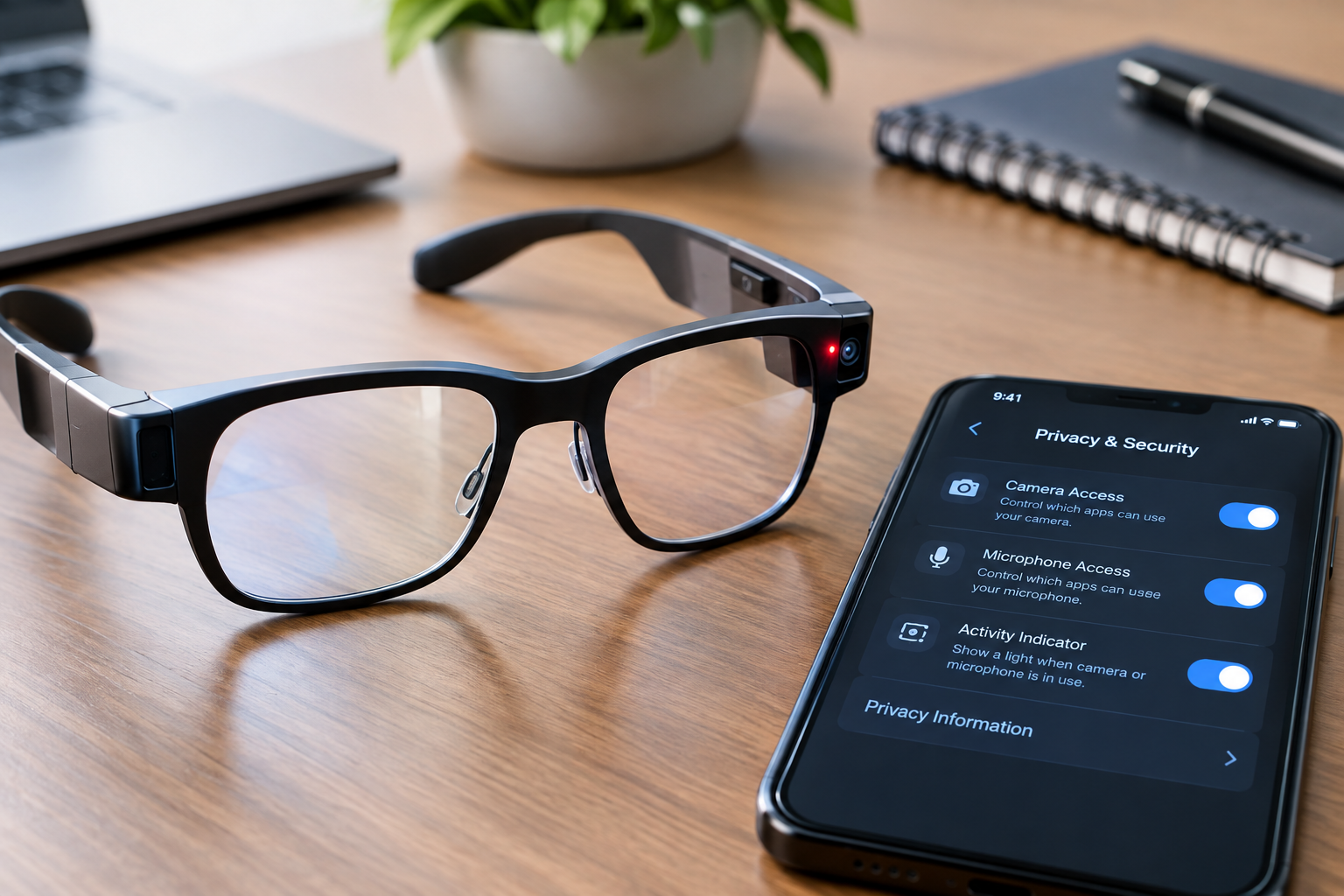
5.1 Recording indicators
Look for a clear recording indicator and understand how it behaves when taking photos or recording video. Do not assume that an indicator makes recording appropriate in every setting.
Respect other people’s privacy, follow workplace and venue rules, and obtain consent when appropriate. Some locations restrict photography or recording in sensitive areas.
5.2 Microphones and connected services
Smart glasses may use microphones to process voice commands and support calls. Review the manufacturer’s privacy policy to understand what audio or related data may be collected, processed, retained, or shared.
Also check whether the glasses require an account, how data is managed, and which controls are available for deleting stored content.
5.3 Smartphone security
Because many smart-glasses features depend on a companion phone, the security of the connected device matters. Use a screen lock, keep the companion app updated, and review its permissions.
Our iPhone vs. Android comparison can help readers evaluate the broader smartphone ecosystem they intend to use with connected wearables.
6. AI Smart Glasses for Work, Study, and Travel
The most useful model depends on how the wearer intends to use it.
6.1 For professionals and remote workers
Camera-and-audio glasses may help with calls, reminders, and hands-free documentation. Display-focused models may appeal to users who want selected information available without looking down at a phone.
However, these devices are not automatically suitable for confidential meetings or workplaces with strict recording policies. Verify your organization’s rules before using them at work.
For a more conventional productivity setup, our best laptops for remote work guide covers devices designed for sustained work sessions.
6.2 For students
Smart glasses may be useful for listening to audio, capturing permitted first-person footage, or accessing supported assistance features. They should not be assumed to replace a laptop or tablet for research, writing, and complex coursework.
Students should also check institutional policies concerning recording, examinations, and AI-assisted work.
Our best mini PCs for students in 2026 guide explores a different category of technology for a study setup.
6.3 For travelers and content creators
Camera-equipped glasses offer a convenient way to capture short clips while keeping hands free. Audio features can also help with calls or supported translation.
The main limitations are battery capacity, camera performance in difficult lighting, recording duration, storage, and privacy. Travelers should test the device before relying on it for an important trip.
7. How to Choose the Right AI Smart Glasses
Before purchasing, use this checklist to narrow down the options.
- Choose the main feature: Decide whether you need a camera, open-ear audio, an in-lens display, or a combination.
- Confirm phone compatibility: Verify that your iOS or Android version is supported.
- Check AI availability: Confirm supported languages, countries, and software features.
- Evaluate fit: Consider frame size, nose pads, temple pressure, and prescription availability.
- Compare real-world battery needs: Look at manufacturer ratings and independent testing where available.
- Review privacy controls: Check recording indicators, app permissions, account requirements, and data policies.
- Calculate the total price: Include prescription lenses, optional accessories, and any relevant service fees.
- Check returns and warranty: Make sure you can return the glasses if the fit or software experience is unsuitable.
A smart-glasses purchase should be based on actual use rather than the novelty of the technology. The most advanced device is not necessarily the most practical one.
8. Frequently Asked Questions About AI Smart Glasses
8.1 What are the best AI smart glasses in 2026?
The Ray-Ban Meta Gen 3 is a strong starting point for people who want a combination of camera, audio, and AI features. Meta Ray-Ban Display is aimed at buyers who want an integrated visual display, while Even Realities G2 emphasizes a more discreet, display-focused experience. The best choice depends on your priorities and budget.
8.2 How much do AI smart glasses cost?
The three models compared here have manufacturer-listed starting prices of $449 for Ray-Ban Meta Gen 3, $799 for Meta Ray-Ban Display, and $599 for Even Realities G2. Prescription lenses and other configurations may cost more.
8.3 Can AI smart glasses take photos and record video?
Some models can. Ray-Ban Meta Gen 3 and Meta Ray-Ban Display include cameras, while other smart glasses prioritize displaying information. Check the precise specifications of the model you are considering.
8.4 Do AI smart glasses work without a phone?
Many popular consumer models depend on a paired smartphone for setup, connectivity, content management, or some AI functions. The amount of standalone functionality varies, so check the manufacturer’s compatibility and connectivity requirements.
8.5 Are AI smart glasses suitable for prescription wearers?
Some models offer prescription lens options. Compatibility depends on the frame, prescription range, and lens configuration. Confirm the exact requirements with the manufacturer or an optician before ordering.
8.6 Can smart glasses replace a smartphone?
Not for most users. They can make certain tasks more convenient, but smartphones remain more versatile for messaging, browsing, detailed photography, navigation, and app-based workflows.
8.7 Are AI smart glasses safe for privacy?
They can be used responsibly, but camera and microphone features require care. Learn how recording indicators work, review privacy settings, and respect consent and local rules. No single privacy feature guarantees that every recording situation is appropriate.
8.8 Are AI smart glasses worth buying for work?
They may be useful for hands-free communication, selected notifications, and permitted first-person documentation. Display-based models may offer additional convenience for supported visual information. They are less compelling if you mainly need a conventional computer display or a complete office productivity system.
9. Final Verdict: Which AI Smart Glasses Should You Buy?
The best AI smart glasses in 2026 are the ones that solve a genuine everyday problem without asking you to compromise too much on comfort, privacy, or cost.
For most people seeking a versatile introduction to wearable AI, the Ray-Ban Meta Gen 3 is the most balanced starting point. Its combination of camera, open-ear audio, and voice-assistant features covers several practical use cases without requiring an integrated visual display.
Meta Ray-Ban Display is the more interesting option for buyers who specifically want information presented in the lens. Its additional capabilities come at a substantial price premium, so it makes sense mainly for people who will regularly use those features.
Even Realities G2 is worth considering for users who prefer a minimalist, display-focused approach. Before purchasing, verify the exact software functions and prescription options that apply to your configuration.
Ultimately, do not pay extra simply because a pair of glasses advertises more AI. Focus on the features you will actually use, the smartphone you already own, and the privacy controls you are comfortable with.
For more connected-device buying advice, explore our smartphone comparison guide, best business laptops in 2026, and best laptops under $1,000. These guides can help you build a technology setup around your needs rather than buying devices on specifications alone.



Leave a Reply